Framekit templates
Start from a designer-made template
 Use template
 Use template
 Use template
 Use template
 Use template
 Use template
 Use template
 Use template
Your producer writes "the cut around the middle feels slow." Your client replies "agree, and the logo thing." Nobody says a timecode, because the email thread you are using instead of a video review tool has nowhere to put one.
You open the timeline, guess, export again, and burn a day. Four rounds later the film ships and you have quietly given away work you never invoiced.
Now price the fix. Frame.io Pro is 15 dollars per member per month, so an editor, a producer and a colourist cost 540 dollars a year before anyone opens a project. Move that same trio to Frame.io Team and it is 900 dollars.
Put them on ReviewStudio Advanced, which has a five-seat minimum, and three people pay for five: 1,200 dollars a year.
That is the part nobody prices before they sign up.
A video review tool is a platform that hosts a cut, plays it for a client in a browser, and attaches every comment to an exact timecode so feedback lands on a frame instead of in a paragraph. The good ones also carry versions, approvals, and a record of who signed off.
The best video review tool in 2026 for creators and small studios is Framekit, because clients comment at the exact frame, draw on the picture, and approve each version on a branded page with no account, and every one of those features is on the free plan with flat pricing instead of per-member seats.
The trade-off is the edit suite: Framekit has no Premiere Pro or Final Cut panel, so Frame.io is still the pick for teams that want client notes landing as timeline markers.
Wipster is the best true single-person plan at 9.95 dollars a month, and SyncSketch is the pick for animation and VFX drawover.
Full disclosure: Framekit is our own product and it ranks first here for the solo editor and the small studio. We tested every tool on the same film, we link to all of them, and each review says where that tool beats us: Frame.io on NLE panels and Camera to Cloud, SyncSketch on 3D and brush depth, Ziflow and Filestage on multi-stage routing and non-video proofing.
How We Tested 12 Video Review Tools
We ran the same job through every platform: a 6-minute brand film, delivered from a 4.2GB ProRes master as a 780MB H.264 review export, shared with three reviewers who left timestamped notes across four revision rounds.
Fresh accounts on free or trial tiers, tested from a European connection in August 2026, no existing subscriptions reused.
In September 2026 we re-verified every Framekit figure against the live product and its plan table, after it shipped frame drawing, version stacks and approval statuses, and moved it to first place as a result.
Three kinds of finding appear below, and we label them differently on purpose. Measured means we did it: uploaded the file, left the comments, clicked the approval, watched what the reviewer saw. Verified means we read it at the vendor's own pricing or documentation page and linked it, without testing it, which is how every enterprise tier and every seat minimum below was established. Community sentiment means creators report it and we could not reproduce it, and we say so in the line itself.
What we weighted, and why
Five criteria, weighted for a working creator rather than a procurement department. Feedback quality (30%): are comments frame-accurate, can a reviewer draw on the frame, does clicking a note seek the player. Real cost for a small team (25%): priced for three people for twelve months, because per-member pricing is the single biggest hidden cost in this category. Client experience (20%): what a non-technical reviewer sees, whether they need an account, how fast they can leave a note. Storage and file limits (15%): per-file caps and duration ceilings, which is where video tools quietly fail. Versioning and approval (10%): version stacks, compare mode, and whether there is a record that someone approved a cut.
We publish no star ratings pulled from vendor pages as if they were ours. Where a third-party rating appears in a review below, it is attributed to the site that collected it.
What Twelve Video Review Tools Cost a Three-Person Team
Here are the numbers the ranking rests on, each one read at the vendor's own published pricing page in August 2026 and priced for the same three-person team reviewing the same 6-minute film.
- 7 of 12 charge per member, so a three-person edit pays three times for one project.
- 2 of 12 charge a flat account price regardless of how many people comment: Framekit and Kollaborate.
- The cheapest way for three people to review video with frame-accurate comments is Framekit Starter at 108 dollars a year, then SyncSketch Indie at 324 dollars, then Wipster Team at 718.20 dollars.
- The most expensive mainstream option here is Filestage Starter at 2,388 dollars a year, priced for a marketing department that needs ten seats, not for an edit suite that needs three.
- 4 of 12 offer a genuinely free tier you could run a real client job on: Frame.io, ReviewStudio, SyncSketch and Framekit.
- Only 1 of the free tiers gives you unlimited projects: Framekit. Frame.io caps free at 2 projects and 2 members, Filestage at 1 active project and 5 new files a month, Ziflow at 2 users with a 60-day review history.
- 8 of 12 support drawn annotation on the frame, which remains the clearest way to say "this corner, this frame": Framekit, Frame.io, SyncSketch, Wipster, ReviewStudio, Filestage, Ziflow and Dropbox Replay.
- Only 2 of 12 carry client notes back into your editing software: Frame.io, through Premiere Pro and Final Cut panels, and Wipster, through Premiere Pro and After Effects extensions.
| Tool | Pricing model | Cost for 3 people, 1 year | Free tier | Drawn annotation |
|---|---|---|---|---|
| Framekit | Flat per account | 108 dollars (Starter) | 10GB pooled, 3GB of it video, unlimited projects | Yes |
| Frame.io | Per member | 540 dollars (Pro) | 2GB, 2 projects, 2 members | Yes |
| Wipster | Per user (Team) | 718.20 dollars | Trial only | Yes |
| SyncSketch | Per user | 324 dollars (Indie) | Under 1GB storage | Yes |
| Vimeo | Per plan, seats included | About 96 euros (Starter, 1 user) | Limited free tier | No |
| ReviewStudio | Per user, 5 seat minimum on Advanced | 432 dollars (Pro) | 5GB, unlimited users | Yes |
| Filestage | Flat, 10 members included | 2,388 dollars (Starter) | 1 project, 5 files a month | Yes |
| Ziflow | Flat, 15 users included | 2,388 dollars (Standard) | 2 users, 60-day history | Yes |
| Dropbox Replay | Add-on from 10 dollars a month | From 360 dollars plus storage | 4 file uploads on paid plans | Yes |
| Kollaborate | Flat per account | 180 dollars (Small Business) | Trial only | No |
| Google Drive | Storage only | Included with Workspace | 15GB | No |
| YouTube unlisted | Free | 0 dollars | Unlimited | No |
Rubric note: the 25% weight on three-person cost is the reason Filestage and Ziflow rank below tools with fewer features.
Both are competent and both cost roughly 2,388 dollars a year at their entry paid tier, which is more than a freelance editor's annual software budget for everything.
We weight cost that heavily because seat pricing is the one expense in this category that grows every time you add a collaborator, whether or not the work grows with it.
Here is how the top four scored out of 10 on each weighted criterion, so the ranking can be checked rather than taken on trust.
| Criterion (weight) | Framekit | Frame.io | Wipster | SyncSketch |
|---|---|---|---|---|
| Feedback quality (30%) | 8 | 10 | 8 | 9 |
| Three-person cost (25%) | 10 | 6 | 5 | 8 |
| Client experience (20%) | 9 | 8 | 9 | 6 |
| Storage and file limits (15%) | 7 | 9 | 7 | 5 |
| Versioning and approval (10%) | 9 | 9 | 7 | 7 |
| Weighted total | 8.65 | 8.35 | 7.20 | 7.35 |
Framekit loses feedback quality to Frame.io because Frame.io's notes reach the timeline as markers, and it loses storage because a free Frame.io seat is not the constraint a 3GB video share is. It wins on cost and on what the client sees.
For a pick matched to how you actually work, jump to the decision tree. First, the field.
The Best Video Review Tools in 2026: Our Rankings
Twelve tools, ranked on the weighted rubric above.
The first four are where most of this category's real decisions get made, so they get the longest reviews; the tail is shorter but every entry carries the one thing that surprised us and the one thing that would bite you in week three.
1. Framekit: Best Overall for Creators and Small Studios

Framekit is an AI website builder with video review built in as its own product, and the review page is the part a client actually touches.
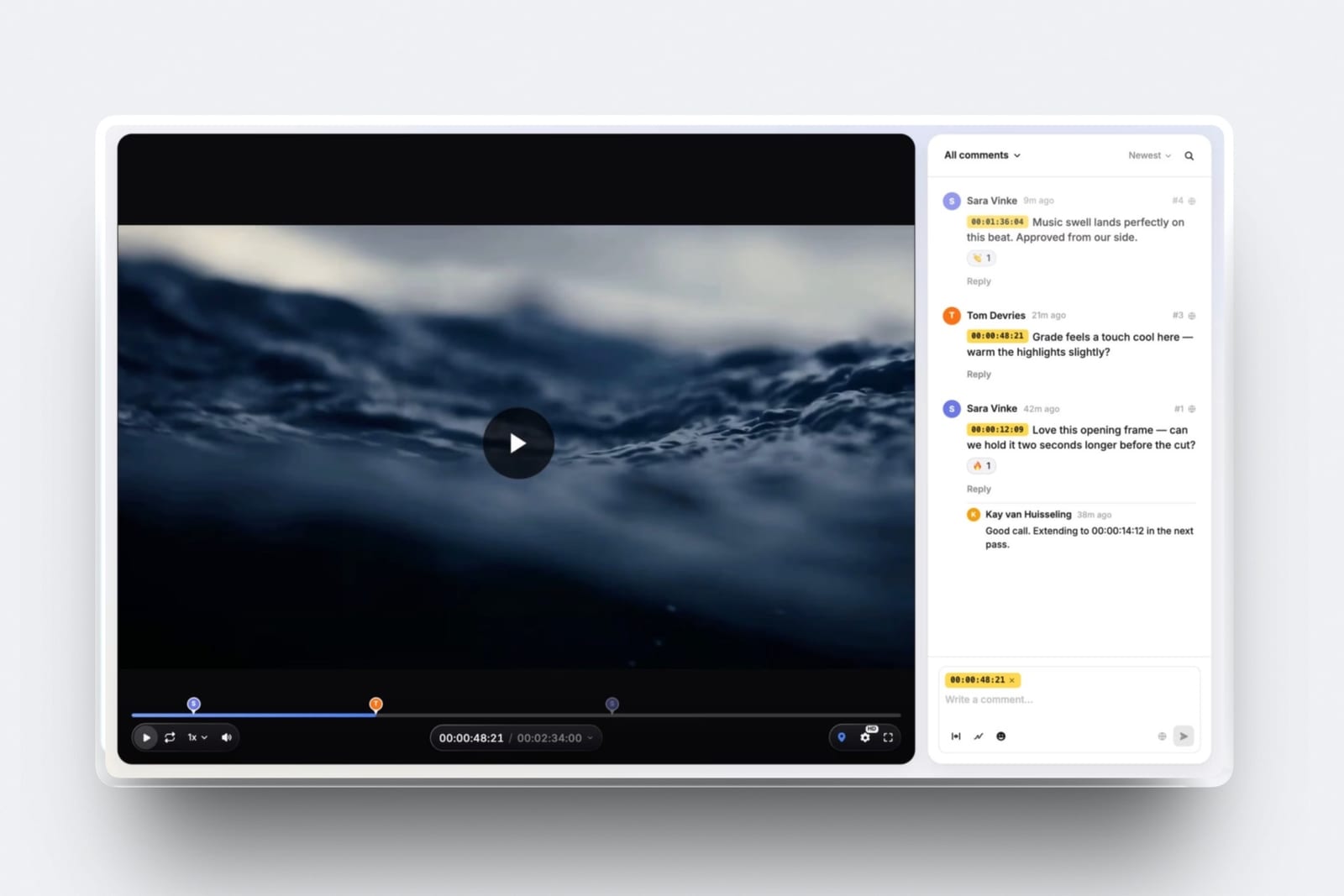
A reviewer opens the link on a phone, types a name, pauses on the frame, circles the logo that sits too close to the lower third, and posts the note. No account, no app, no invite email to accept.
The comment lands in your sidebar as a timecode chip, and clicking it puts the player on that frame with the drawing on top.
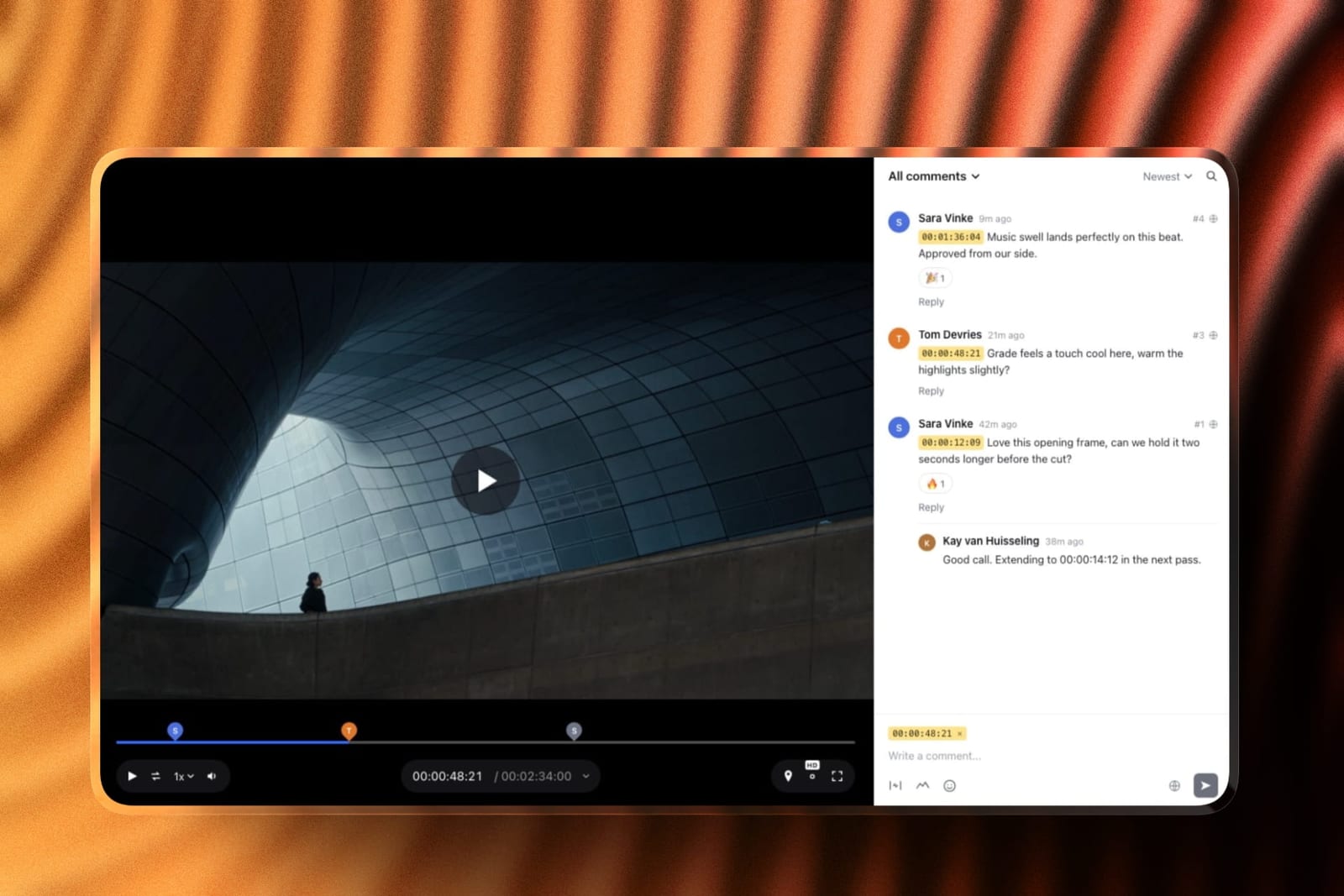
The real numberreview projects are unlimited on every plan, including free, and the price is per account rather than per person.
Starter is 9 dollars a month, 108 dollars a year, with 50GB of pooled storage of which 15GB can be video and a 1GB per-file cap, which a 780MB review export clears.
Reviewers comment as guests at no extra cost, so a producer and a colourist add nothing to the bill.
The standout detailversion stacks with approval statuses on the free plan. Upload v2 on top of v1 and the old cut keeps every note it collected, one click away, while the client moves v2 from Needs review to Approved and v1 keeps its own history. Frame.io charges per member for the same shape.
The honest gotchathe notes stop at the browser. There is no Premiere Pro, Final Cut or Resolve panel, so on a 40-note round you are reading comments on one screen and scrubbing your timeline on the other, which is the exact step Frame.io removes.
Storage is also the limit you meet first on free: 3GB of video holds three 780MB exports and refuses the fourth.
Skip it ifyou cut in Premiere Pro or Final Cut with an assistant and a producer who all need logins, restricted folders and notes as timeline markers, or if you proof print and packaging alongside video. Framekit reviews video only.
Verdict: the best video review tool for one editor or a small studio in 2026, because drawing, versions, approvals and a branded client page cost nothing to start and never scale with headcount. The review also sits in the same account as your portfolio, client galleries and store.
2. Frame.io: Best for Teams Inside Adobe
Frame.io is the tool the rest of the category is measured against, and using it back to back with everything else makes clear why. Comments are frame-accurate and range-based, so a note can cover 4 seconds rather than a single instant.
You can draw on the frame. The comment list exports, prints with annotation thumbnails, and copies between assets.
The Premiere Pro and Final Cut panels pull that feedback into the timeline as markers, which removes the single most wasteful step in the whole process: retyping a client's notes into your NLE.
The real numberPro is 15 dollars per member per month and includes 2TB, plus another 2TB for each additional member.
For our three-person team that is 45 dollars a month, 540 dollars a year, and 6TB of storage nobody on a 780MB review export will ever touch. You are not paying for storage at that tier. You are paying for seats.
The standout detailCamera to Cloud is on the free plan.
A 2GB free account with two projects can still take footage straight off a supported camera or recorder into a Frame.io project during the shoot, which is a genuinely unusual thing to give away and a real reason to keep a free account open even if you review elsewhere.
The gotchathe free tier's 2-project cap is tighter than it sounds.
Projects are not jobs you finish and archive; a project holds its version stack and its comment history, and deleting one to free a slot deletes the record of what the client approved.
Two projects means one live job and one you are afraid to touch.
Skip it ifyou are one person. A solo editor pays 180 dollars a year for a 2TB account they will use 2% of, and every feature that justifies the price, restricted folders, internal comments, multi-member workspaces, exists to solve problems a single freelancer does not have.
What reviewers say elsewhereFrame.io holds strong ratings on G2, where the recurring criticism is pricing after the Adobe consolidation rather than the product itself.
Verdict: the correct default for any team of three or more that lives in Adobe, and the only tool here worth its seat price purely for the timeline panels. It is also the wrong tool to buy alone, which is a distinction most reviews of it refuse to make.
Already on Frame.io and feeling the per-seat bill?
Our Frame.io alternatives guide prices the flat-rate options, and the filmmaker side of the decision is in website builders for filmmakers.
3. Wipster: Best True Single-Person Plan
Wipster is one of the few platforms here that sells a plan to one human being without pretending they are a team of one.
Light is 9.95 dollars a month billed annually, 11.95 monthly, with 50GB, unlimited projects and unlimited sharing. That is a fully functional review account, not a trial with the good parts removed.
The real numberthe jump to Team is where it gets expensive. Team is 19.95 dollars per user per month annually, so our three-person group pays 718.20 dollars a year for 250GB. That is more than Frame.io Pro costs the same three people, for less storage and no NLE panel.
The standout detailthe reviewer experience is unusually plain, in a good way. A client who has never used a review tool gets a player, a comment box and a list, without a project browser or a workspace concept to learn first.
For one-off clients who will use the link once and never return, that matters more than feature depth.
Wipster also ships Adobe Premiere Pro and After Effects extensions and pinpoint annotation with shapes, arrows and freehand drawing, which makes it the only tool in this comparison outside Frame.io that pulls client notes back toward your timeline.
The gotchathe storage ladder on Team starts at 250GB and expands to 1TB through add-ons, which sounds generous until you are storing ProRes rather than review exports. Three or four feature-length masters and you are buying add-ons on top of a per-user bill.
What reviewers say elsewhereWipster rates 4.8 out of 5 from 75 reviews on Capterra, one of the higher scores in this category, though on a much smaller review base than Frame.io.
Verdict: buy Light if you are one person and you want a review tool that is only a review tool. Do not scale it to a team; the per-user price stops making sense at exactly the point you would need it to.
4. SyncSketch: Best for Animation and VFX
SyncSketch is built around drawover, and it is the best implementation of it here. Team at 19 dollars per user per month adds customisable sketching brushes, 3D model support and no upload or user cap, which is a sentence that only makes sense if you understand its audience: animation and VFX supervisors reviewing shots, not editors reviewing cuts.
The real numberIndie is 9 dollars per user per month billed yearly, with up to 15 users, 50GB storage and 100GB of uploads. Three people cost 324 dollars a year, the second-cheapest way in this comparison to get frame-accurate drawn feedback for a small team.
The standout detailthe PDF summary. SyncSketch will generate a document of a review session with screenshots, annotations and comments in it, which is the artifact a supervisor actually forwards to an artist who was not in the session.
No other tool here produces something you can email to someone with no account and no login.
The gotchathe free Light tier is under 1GB of storage with a 2GB monthly upload limit, which is not enough to run a client job on. Treat it as an evaluation tier, not a free plan.
Skip it ifyou cut live-action commercials and brand films. The whole product assumes shot-based iteration, and a 6-minute film with four rounds of general notes does not benefit from any of what you are paying for.
Verdict: if your feedback is drawings on frames, this is the tool, and the Indie tier makes it affordable in a way its enterprise competitors are not. If your feedback is sentences with timecodes, buy something else.
5. Vimeo: Best If You Already Host There
Vimeo folded review and collaboration into its hosting plans rather than selling it separately, which makes it the cheapest possible answer if you were already paying for Vimeo, and a strange answer if you were not.
Starter is 8 euros a month billed annually with 1 user and 2TB, and lists review and collaboration tools as an included feature.
The real numberthe seat count is the constraint, not the price. Starter is one user. Standard, at 19 euros a month annually, is five users and 4TB.
Our three-person team therefore pays about 228 euros a year on Standard, and gets player branding, a custom watermark and lead capture they may not need, because those are what the tier is really selling.
The standout detailthe review tools sit next to a genuinely good hosting product, which means the same file that your client reviews can become the embed on your website without a re-upload. Nothing else here does that.
The gotchapricing renders in the currency of your connection. We read euros from a European connection, and a US visitor sees dollars at figures that do not convert one to one, so verify at the page before you budget.
Verdict: a sensible add-on for anyone already inside Vimeo, and a poor reason to move there. If hosting is the actual problem you are solving, our Vimeo alternatives guide covers that decision properly.
6. ReviewStudio: Best Free Plan for Unlimited Users
ReviewStudio's free Starter tier is the most generous free plan in this comparison on one specific axis: unlimited users and unlimited guests on 5GB of storage, with versioning, compare mode, present mode and approval management included rather than held back.
The real numberPro is 12 dollars per user per month annually with 25GB per user, so three people cost 432 dollars a year and 75GB.
Advanced, at 20 dollars per user annually, carries a five-user minimum, which means a three-person team pays for five: 1,200 dollars a year for features it is not fully using.
The standout detailcompare mode and present mode on the free tier. Present mode lets one person drive a review while others watch, which is a live-session feature most competitors reserve for paid plans or do not have at all.
The gotchathe 5-user minimum on Advanced is the seat-minimum trap in its clearest form, and the features most small studios want, comment privacy and client teams, are all above that line.
Verdict: the best free plan to hand to a large group of occasional reviewers, and a tool that gets expensive precisely at the size where you would want to commit to it.
7. Filestage: Best for Approval Chains
Filestage is not really competing for the freelancer. It is a review and approval platform for marketing teams, and its structure, reviewer groups, due dates, review reports, automations, is aimed at getting eleven stakeholders to sign off in a defined order.
The real numberStarter is 199 dollars a month, 1,990 dollars a year, including 10 team members and 1TB. Business is 329 dollars a month.
For our three-person edit that is 2,388 dollars a year at the entry tier, roughly twenty times what the same three people pay on Framekit Starter, for a workflow engine they will not use.
The standout detailthe free tier's shape is unusually honest about who it is for. 10 team members and unlimited reviewers, but 1 active project and 5 new files a month. It is sized as a permanent demo for a department, not a working plan for a creator.
The gotchaseats are added in bundles of five, so growing from 10 to 11 people costs the same as growing from 10 to 15.
Verdict: the right tool if approval is a process with stages and a paper trail, and the wrong tool if approval is one producer saying yes. Nothing about its price makes sense below about ten people.
8. Ziflow: Best for Multi-Format Proofing
Ziflow supports over 1,200 file types, and that is the whole pitch. If a job means reviewing a video, a print-ready PDF, a packaging dieline and a set of static ads in one system, Ziflow is built for it in a way none of the video-first tools here are.
The real numberStandard is 199 dollars a month billed annually with 15 users and 1TB; Pro is 329 dollars with 20 users and 2TB. Same 2,388 dollar entry point as Filestage, aimed at the same buyer.
The standout detailthe free Personal tier keeps 60 days of review history and then rolls it off. That is an unusual limit, and a clarifying one: on the free tier your record of what a client approved has an expiry date.
The gotchaworkflow stages are the real paywall. Free gets 1 stage, Standard 2, Pro 3, and unlimited stages sit behind Enterprise. If routing is the reason you are buying, the tier you need is the one without a published price.
Verdict: the best proofing tool here for agencies whose deliverables are not only video. If everything you ship is a timeline, its strength is the part you will never use.
9. Dropbox Replay: Best If Your Files Already Live in Dropbox
Replay is a video review layer bolted onto storage you probably already pay for, with frame-accurate comments, versions and live review. If your masters are already in Dropbox, the friction of not re-uploading them anywhere is a real advantage.
The standout detailreviewers can draw directly on the frame with colour and stroke-width control, and in a live review session everyone sees each other's drawings and cursors in real time.
No Dropbox account is required to leave that feedback, which is more than several dedicated review tools manage.
The real numberReplay is an add-on starting at 10 dollars a month on top of a Dropbox plan. What is bundled into Plus, Standard and Advanced is listed as 4 file uploads, plus live review, versions and video collaboration.
The gotcha, and it is the one to write downthat bundled entitlement is four files. Not four projects, not four a month as far as the plan table states, four uploads. A single job with four rounds of revisions exhausts it.
Past that you buy the add-on, so treat the bundled Replay in your existing Dropbox plan as a sample rather than a feature.
Skip it ifyour clients are not in Dropbox. The advantage is entirely about where your files already are; strip that away and you are paying an add-on price for fewer features than Frame.io Pro.
Verdict: good value as a fifth line item on a Dropbox bill you were paying anyway. A bad place to start from zero.
10. Kollaborate: Best Granular Storage Ladder
Kollaborate publishes twelve tiers, which sounds absurd until you notice what it buys you: you can match your storage to your actual footage volume instead of jumping from 250GB to 1TB and paying for the gap. Basic is 7 dollars a month or 60 dollars a year for 30GB; Small Business is 25 dollars a month for 60GB and 5 team members; Production is 129 dollars a month for 1TB and unlimited members.
The real numberthree people on Small Business is 180 dollars a year flat, one of only two genuinely flat-priced options in this comparison. Unlimited bandwidth is included on every tier, which matters when a client rewatches a cut nine times.
The standout detailunlimited projects at every tier including the cheapest, and unlimited team members from the Production tier up. The pricing axis is storage, consistently, all the way down the ladder.
The gotchathe interface has not been redesigned in a long time, and a client opening it will notice. For internal use that is irrelevant; for a first impression with a new brand client it is not.
Verdict: underrated on price and structure, dated on presentation. If your clients never see it, it is one of the best-value team options here.
11. Google Drive: Best Free Baseline
This is what most people actually do, so it belongs in the ranking honestly rather than as a joke. Drive holds the file, the link works for anyone, the 15GB free tier covers a review export comfortably, and there is a comment box.
The gotchathe comment box is not attached to the timeline. A note on a video file in Drive is a note on the file, so your client writes "at about 1:12" and you scrub to find out they meant 1:19.
Every unbilled revision round in the opening of this article starts here. That is the cost, and it is not zero: one extra round at a 600 dollar day rate costs more than four years of Framekit Starter.
Verdict: fine for sending a cut to someone who will reply on WhatsApp anyway. It is not a review tool, and treating it as one is the specific mistake this category exists to fix. If transport is the actual problem, see our guide to WeTransfer alternatives.
12. YouTube Unlisted Links: Best Zero-Cost Fallback
Free, universal, and playable on any device your client owns without an account, a login or an explanation. For a rough cut going to someone who is not paying you yet, it is defensible.
The gotchaunlisted is not private. The URL is guessable in principle and shareable in practice, there is no password, no expiry and no download control, and YouTube will re-encode your grade into something you did not approve.
Comments carry no timecode, and the recommendation strip puts other people's work next to yours.
Verdict: acceptable for a personal rough cut, wrong for any client work under NDA and wrong for anything where the grade matters. Use it knowing exactly what you gave up.
What the Seat Tax Actually Costs Over Three Years
In one lineper-member pricing means the cost of reviewing one video scales with the size of your crew even though the video itself, the storage it occupies and the bandwidth it costs do not change at all.
Run the arithmetic on a three-person team over three years, which is a realistic life for a tool choice. Frame.io Pro: 1,620 dollars. Wipster Team: 2,154.60 dollars. ReviewStudio Pro: 1,296 dollars. SyncSketch Indie: 972 dollars.
Framekit Starter: 324 dollars. Kollaborate Small Business: 540 dollars. Filestage Starter: 7,164 dollars.
The spread between the cheapest and most expensive way for three people to leave timestamped comments on a video is over 6,800 dollars across three years, and the feature difference that justifies it is much smaller than the price difference implies.
Filestage does not do 22 times more than Framekit. It does workflow routing for ten people, and you are three.
The test you can runcount the people who will actually leave a comment on your next job, including clients. If that number is above ten, flat-priced tools like Filestage and Ziflow start to win on cost.
If it is under five, every per-member tool in this list is charging you for a team structure you do not have.
There is one honest counterweight. Per-member pricing buys per-member accounts, and those accounts carry permissions, restricted folders and audit trails.
Framekit's flat price works because reviewers are guests rather than seats, and its team members are site admins rather than review seats, so there is no per-folder permission model to hand an assistant editor.
Cheap and simple are the same trade here, not two separate wins.
Which Feedback Actually Survives the Handoff
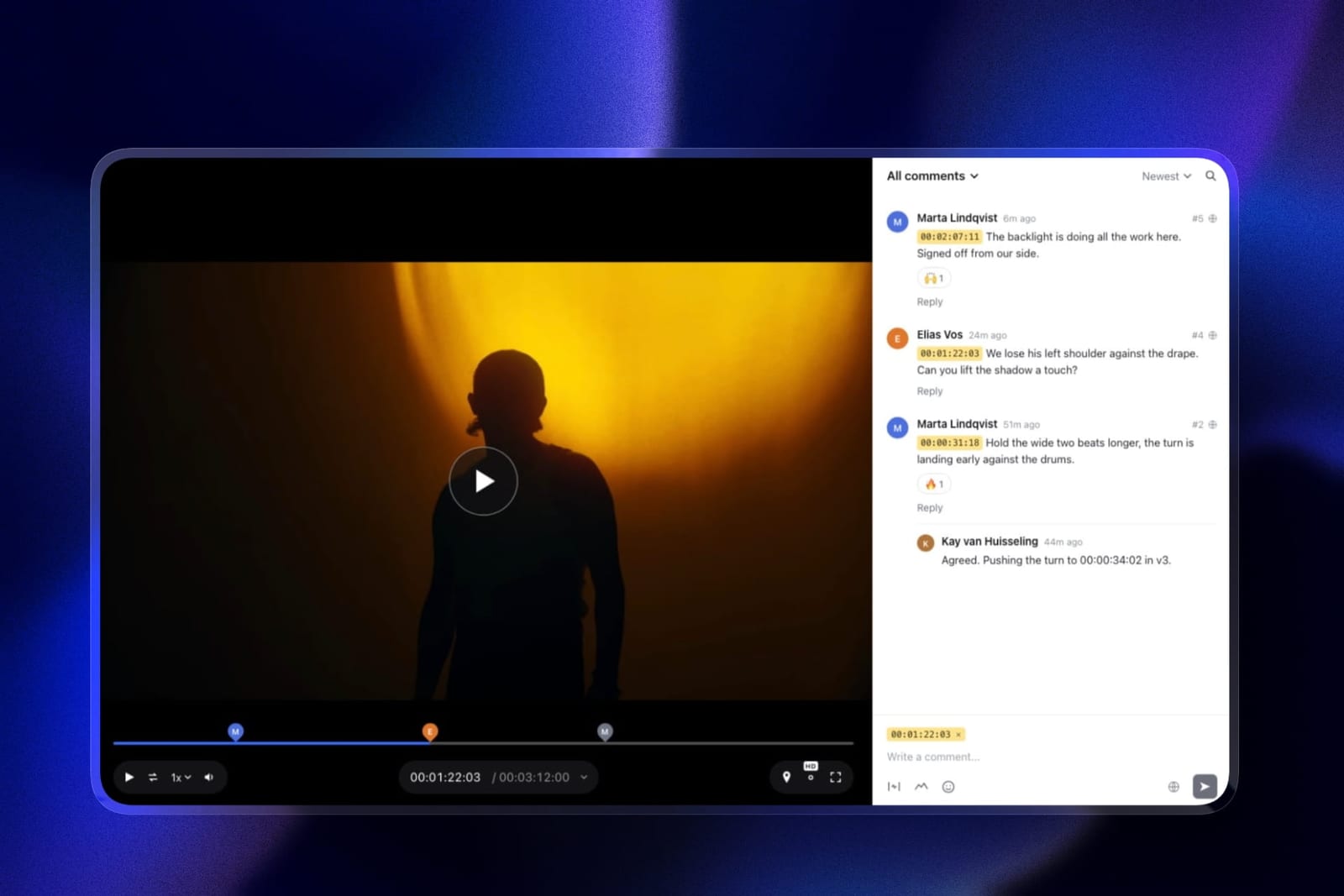
In one linea comment is only useful if it arrives attached to a frame and leaves attached to a frame, because everything between those two points is you guessing what your client meant.
There are three grades of feedback fidelity in this category, and the difference between them is where the revision rounds go.
Grade one, proseGoogle Drive, YouTube, email. The client describes a moment. You interpret it. Every note costs a scrub and a guess, and ambiguity gets discovered at export time.
Grade two, timestamped textVimeo, Kollaborate. The comment carries a timecode, clicking it seeks the player, and there is no ambiguity about when. There can still be ambiguity about where in the frame, which is why "the thing in the corner" still costs a message.
Grade three, annotatedFramekit, Frame.io, SyncSketch, Wipster, Filestage, Ziflow, ReviewStudio, Dropbox Replay. The reviewer draws on the frame, so when and where are both fixed.
Frame.io and Wipster go one step further and carry the notes back into your editing software, Frame.io through its Premiere Pro and Final Cut panels and Wipster through Premiere Pro and After Effects extensions, so nothing is retyped.
Call that grade four; only two tools reach it.
Most creators need grade three and are currently on grade one. Moving from prose to timecodes removes most of the waste, and drawing removes the "which corner" message.
Framekit puts both on a free plan with unlimited projects, which is most of why it moved to first place. Grade four is worth its seat price only if you are retyping dozens of notes a week.
The Fine Print Before You Commit
In one linethe limits that break a video review tool in practice are per-file caps and duration ceilings rather than the monthly price, and almost nobody checks them before the upload fails.
Per-file caps. Framekit caps uploads at 500MB on free, 1GB on Starter, 2GB on Pro, 3GB on Business. A 780MB review export needs Starter. A long ProRes master needs somewhere else entirely, because none of these tools want to be your archive.
Duration ceilings. Framekit rejects sources over 2 hours and plans its encoding rungs by length: a 1080p proxy is generated up to 25 minutes, 720p up to 55 minutes, 360p up to 2 hours.
A long standard H.264 export at 1080p or below plays the original file at full quality rather than a downscale, so a 90-minute assembly is watchable, but the hover-scrub preview stops being generated past an hour.
What happens when you stop paying. On a per-member tool, removing a member removes their access to comment history they wrote.
On storage-limited tools, the review record lives inside the platform, so the answer to "what did the client approve" is only available while the subscription is. Export or screenshot approvals on anything you might be asked about later.
Guests versus seats. Every tool here lets clients comment without buying them a seat.
Verify the ceiling: Filestage free allows unlimited reviewers but 2 reviewer groups, Ziflow free is unlimited reviewers on 2 users, and Framekit treats every collaborator as a guest by design.
Branding. Framekit hides the "Powered by Framekit" badge on any paid plan and shows it on free. Frame.io puts custom-branded shares behind Pro. Wipster puts custom branding on Team.
If your client should see your name and not your vendor's, that feature is priced differently everywhere and is worth checking before you commit.
How to Choose a Video Review Tool: A Decision Tree
Work down these questions in order and stop at the first one you answer yes to, because they are sequenced by how much each constraint narrows the field rather than by how important the feature sounds.
- Do your clients draw on frames, or describe moments? If they draw, you need grade three. Go to Frame.io if you cut live action, SyncSketch if you do animation or VFX.
- Do you edit in Premiere Pro or Final Cut and retype notes into your timeline? Frame.io for Premiere Pro and Final Cut, or Wipster if you work in Premiere Pro and After Effects. Those two are the only tools here that remove that step, and for a working editor it is worth the seat price on its own.
- Are you one person? Framekit free, with drawing, versions and approvals on unlimited projects, or Wipster Light at 9.95 dollars a month if you want the After Effects extension.
- Are you two to four people who all comment? Framekit Starter, with everyone commenting as a guest, or Kollaborate Small Business if each person needs a login. Flat pricing is the entire argument, and at this size it is decisive.
- Do more than ten people need to approve, in a defined order? Filestage or Ziflow. The price stops looking absurd around here, and workflow stages are a real feature you cannot fake.
- Do you also review print, packaging or static ads? Ziflow, for the 1,200 file types.
- Are all your masters already in Dropbox? Add Replay, and budget for the add-on rather than the four bundled uploads.
- Do you need a review page on your own domain next to your reel? Framekit, because the review, the portfolio and the client galleries are the same subscription. See also our comparison of portfolio builders for videographers.
Frequently Asked Questions
What is the best video review tool in 2026?
Framekit is the best video review tool in 2026 for solo creators and small studios, because frame-accurate comments, drawing on the frame, version stacks and client approval are all on the free plan, review projects are unlimited, and pricing is flat per account rather than per member.
Frame.io is the better choice for teams in Premiere Pro or Final Cut, because its panels carry client feedback into the timeline as markers.
Is there a genuinely free video review tool?
Yes, four of them. Framekit's free plan gives 10GB of pooled storage, of which 3GB can be video, with unlimited review projects, drawing and approvals, and a 500MB per-file cap. Frame.io free gives 2GB with 2 projects and 2 members.
ReviewStudio free gives 5GB with unlimited users and guests. SyncSketch Light gives under 1GB with a 2GB monthly upload limit.
Filestage and Ziflow both have free tiers, but at 1 active project and 60-day history respectively they function as demos rather than working plans.
Why do video review tools charge per member?
Because seats are how the category was priced for post-production facilities, where every editor, assistant and producer has an account.
Seven of the twelve tools here charge per member, so a three-person edit pays three times to review one video. Frame.io Pro is 15 dollars per member per month, meaning 540 dollars a year for three people.
Framekit and Kollaborate charge a flat account price instead, which is why they cost 108 and 180 dollars a year for the same three people.
Does Framekit have frame-accurate annotation?
Yes. Framekit reviewers can draw on the paused frame with freehand, arrows, lines, rectangles and ellipses, and the drawing is saved with a comment pinned to that timecode or to an in and out range.
What Framekit does not have is an editing-software panel, so the drawing stays in the browser. If you want annotations to arrive as markers in Premiere Pro or Final Cut, Frame.io is the tool, and for 3D drawover SyncSketch is deeper.
How many review projects can I run at once?
It depends entirely on the tool and this is the limit most people discover too late. Framekit allows unlimited review projects on every plan including free, with storage as the only limit. Frame.io free caps at 2 projects.
Filestage free allows 1 active project and 5 new files a month. Wipster, Kollaborate and Ziflow all advertise unlimited proofs or projects on their paid tiers.
What file size can I upload to a video review tool?
Framekit caps uploads at 500MB on free, 1GB on Starter, 2GB on Pro and 3GB on Business, and rejects source files longer than 2 hours.
Most competitors limit total storage rather than per-file size: Frame.io Pro includes 2TB, Wipster Light 50GB, SyncSketch Indie 50GB, ReviewStudio Pro 25GB per user.
Check both numbers, because a generous storage tier with a small per-file cap will still refuse your master.
Can clients comment without creating an account?
Yes on every tool in this comparison, though the details differ. Framekit allows anonymous guest comments by default and can optionally require an email address or a password before the page opens.
Frame.io, Wipster, ReviewStudio and Filestage all support unlimited external reviewers without buying them seats.
Verify the reviewer-group caps on Filestage and Ziflow free tiers, which limit how reviewers can be organised rather than how many there are.
Is Frame.io still worth it after the Adobe consolidation?
For teams inside Adobe, yes, because the Premiere Pro and Final Cut integrations are the reason to buy it and they have not been reduced. The recurring complaint in third-party reviews is per-member pricing rather than the product.
For a single freelancer paying 180 dollars a year for a 2TB account, the answer is usually no, and a flat-priced tool will do the same job for less.
What happens to my client feedback if I stop paying?
The comment history lives inside the platform on every tool here, so losing the subscription usually means losing the searchable record of what was approved and when.
On per-member tools, removing a member can also remove access to comments that member wrote. Before you cancel anything, export the comment list where the tool supports it, Frame.io and SyncSketch both do, or screenshot the approval.
Which video review tool is cheapest for a three-person team?
Framekit Starter at 108 dollars a year, because the price is flat per account rather than per member. Kollaborate Small Business is next at 180 dollars a year for 5 members and 60GB.
SyncSketch Indie is 324 dollars a year for three at 9 dollars per user. Frame.io Pro is 540 dollars. Filestage Starter and Ziflow Standard both cost about 2,388 dollars a year, because both are priced for ten to fifteen people.
Can I review video and deliver photos in the same tool?
Rarely, and it is worth checking if you shoot both. Framekit runs video review and client photo galleries from one pooled storage allowance under one subscription, so a hybrid shooter delivering stills and a cut does not pay two vendors.
Frame.io handles stills as assets but is not a client delivery gallery, and dedicated gallery platforms do not do timestamped video review.
Our client gallery platforms comparison covers the photo side of that decision.
Do I need a website to share a video review link?
Not with every tool. Framekit provisions the address automatically when you publish a review, so the page exists at your subdomain even if you have never built a site.
Frame.io, Wipster, SyncSketch and the rest all generate share links independent of any website. What differs is whose brand the client sees on the page, which is a paid feature almost everywhere.
Final Verdict
Framekit is the best video review tool in 2026 for one editor or a small studio, and the reasons are specific rather than promotional: frame-accurate comments, drawing on the frame, version stacks and client approval on every plan including free, unlimited review projects, and flat pricing that does not scale with how many people comment.
For three people that is 108 dollars a year against 540 on Frame.io Pro, and the review sits in the same account as your portfolio, client galleries, Slides decks and store.
Frame.io is the right buy for a team of three or more inside Adobe, because NLE panel integration removes the retyping step that no browser-based tool can. If you cut in Premiere Pro and more than two people comment, it earns its seat price.
Where Framekit loses, and who it is not for. Framekit will not put client notes into Premiere Pro, Final Cut or Resolve, it has no Camera to Cloud, and it reviews video only, so print, packaging and PDF proofing belong in Ziflow or Filestage.
If you need per-folder permissions for a staff of editors, Frame.io Team or ReviewStudio Advanced is the better fit. If approval is a multi-stage process with ten or more signatories, Filestage and Ziflow are built for it and we are not.
And if your masters already live in Dropbox and you only need light review, adding Replay is less disruptive than moving anything.
Every tool here beats a link in an email with "the middle feels slow" under it. Pick the cheapest one that matches how your clients actually talk, and buy the annotation tier only if they actually draw.
Related readingthe best website builders for filmmakers, portfolio builders for videographers, client gallery platforms compared, and the best AI tools for filmmakers.
Genre-specific picks: wedding videographers, documentary filmmakers and YouTube creators.
Prices in this guide were read at each vendor's own published pricing page in August 2026, and Framekit's features and limits were re-verified in September 2026.
Vimeo and Dropbox figures were served in euros from a European connection; verify your local currency before budgeting.