Framekit templates
Start from a designer-made template
 Use template
 Use template
 Use template
 Use template
 Use template
 Use template
 Use template
 Use template
Every social media manager gets judged by their own feed, and the feed is the wrong evidence.
A personal account with 4,000 followers proves you can post consistently.
It does not prove you took a local gym from 900 to 11,000 followers in eight months, that 38% of their new memberships now cite Instagram, or that you did it on four hours a week.
Those are the facts that close a $2,500-a-month retainer, and there is nowhere on a social platform to put them.
That is the entire case for a social media manager having a website, and it explains what the site actually has to contain.
A website builder for social media managers is a tool for publishing a site without code, and the features that matter for this specific job are case-study pages that carry numbers, a services page with pricing, and an enquiry route that qualifies people before a call.
Framekit is the best website builder for social media managers in 2026, because one account holds the case-study site, a store for templates at 5% falling to 0% on the $39 plan, video review links where clients approve each reel at the frame, delivery galleries and Slides strategy decks.
The trade-off is scheduling: Squarespace, from EUR 11 a month, is the better pick if paid discovery calls with deposits are your funnel. Carrd is the cheapest credible one-page option, and a link-in-bio tool is not a website.
Full disclosure: We build Framekit and rank it first. We read every competitor's pricing page the same way, and Squarespace's entry says exactly where it beats us.
The Three Pages That Win Retainers
Most social media manager websites are a homepage, an about page and a contact form. The three pages below outperform all of them, and only one of them is about design.
The case study with numbers. Not a screenshot of a grid. A page with the starting position, what you changed, what happened, over what timeframe, and what it meant commercially.
Three of these outperform a portfolio of forty client logos, because a prospect is trying to predict their own outcome and a logo predicts nothing.
The services page with prices. Published starting prices filter out the enquiries you would decline anyway and pre-qualify the rest.
The most common objection, that competitors will see them, is true and irrelevant, because competitors can see them anyway by sending a fake enquiry.
The process page. What the first 30 days look like, what you need from the client, how approvals work, what you report and when. This is the page that converts a hesitant prospect who has been burned by a previous manager, and almost nobody publishes it.
In one lineNumbers, prices and process, in that order, and everything else is decoration.
What This Comparison Weighted
Prices came from each vendor's own pricing page in August 2026, including Squarespace's, and euro figures are quoted as shown rather than converted into dollars.
| Builder | Entry price | Digital selling fee | Booking with deposits |
|---|---|---|---|
| Squarespace | EUR 11 a month | 7% on Basic, 5% on Core, 0% on Advanced | Yes |
| Framekit | Free, then $9 | 5%, 3% on Pro, 0% on Business | No, but client approvals and delivery included |
| Carrd | A few dollars a year | No store | No |
| Wix | Free with branding | Varies by plan | Yes |
| Kit | Free to 1,000 subscribers | Sells on the free plan | No |
Case-study capability first. Whether the tool makes it straightforward to publish long-form, image-heavy pages with structured data such as results and timeframes, or whether every one is a hand-built layout.
Commerce second. Many social media managers sell templates, audits, content calendars and courses alongside retainers, and the transaction fee on those is a real cost.
Enquiry handling third. Forms that qualify, scheduling that books, and where the enquiry goes when it arrives.
Delivery and approvals fourth. Whether the same account lets a client approve content and collect files, because the retainer is won on the site and kept on the approval loop.
What we did not measurehow many clients any site produced. Framekit's entry was re-verified in September 2026 against its product and plan table, after its video review, galleries and Slides shipped, and describes what ships rather than a test.
That is unknowable across a comparison, and any guide implying otherwise is describing something it cannot see.
In one lineRanked on case studies, selling and enquiry handling, with prices read at source.
1. Framekit: Best Overall for Social Media Managers

Framekit is an AI website builder that generates a site and store from a description of what you do, and it ranks first here because it covers the three pages that win retainers and the part of a retainer most builders ignore: getting content approved.
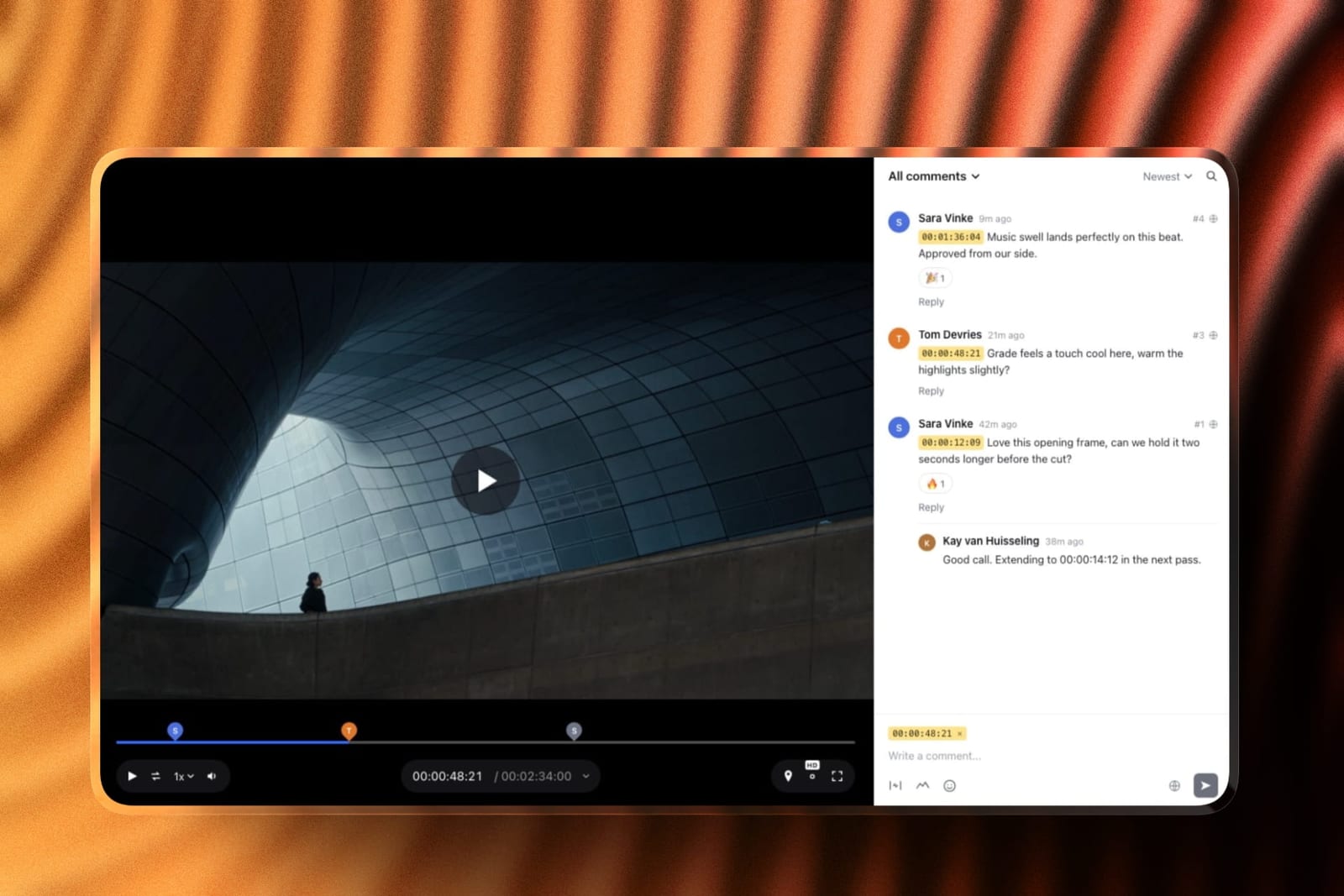
What that looks like in practicecase-study pages, a services page and a process page on your own domain, plus a store selling content calendars, caption templates, audit templates or guides. Then the delivery side.
Reels and ads go to the client as a video review link, where they comment at the exact frame, draw on the picture and mark each version Approved or Needs changes without an account.
Shoot photos go out in a client gallery where they heart their favourites. The monthly strategy deck or pitch can be built in Framekit Slides, with charts and your own fonts and colours, and shared as a link or PDF.
The real number5% on product sales on Free and Starter, 3% on Pro at $19 a month and 0% on Business at $39. A $29 template selling 40 times a month is $1,160, where a 7% fee is $81 and the Business plan is $39. Signup forms take 500 entries a month on the free plan and unlimited on Business.
The standout detailthe process page can link to the real thing. "How approvals work" becomes a sample review link a prospect can open, which says more about how you run a retainer than any paragraph.
The honest gotchano appointment scheduling with deposits, which is a genuine gap for anybody selling paid strategy calls, and Squarespace does it well. There is also no social scheduling or analytics reporting, so publishing and performance numbers still come from your scheduler.
Skip it ifpaid discovery calls are your main funnel and you want the calendar and the site in one product.
Verdict: the best website builder for social media managers in 2026 when the business is retainers plus products, because the site, the store, client approvals, content delivery and strategy decks share one account. Second to Squarespace if the calendar is the business.
2. Squarespace: The Safe Professional Choice for Paid Calls

Squarespace is the default recommendation for a social media manager who wants a credible site and a booking system in one subscription, without assembling three separate products and keeping them talking to each other.
Pricing, read from its own page in August 2026 serving eurosBasic at EUR 11 a month, Core at EUR 17 and Advanced at EUR 29, billed annually. Its online store fee is 2% on Basic and 0% on Core, with a separate digital content and memberships fee of 7% on Basic and 5% on Core, reaching 0% only on Advanced.
Why it fits this role specificallyscheduling with deposits. A social media manager selling strategy calls, audits or onboarding sessions needs a calendar that takes money, and this is the strongest implementation in the comparison.
The gotcha for this audiencethat second fee column. Selling a $79 content calendar template on the Basic plan costs 7%, not the 2% most guides quote, which our Squarespace comparison sets out in full.
Verdict: The best choice when the business runs on paid calls, and the wrong plan tier if you sell digital products on Basic.
3. Carrd: One Page, Nearly Free
Carrd builds single-page sites for a few dollars a year, and for a manager whose entire funnel runs through direct outreach and referrals, that is often enough.
Where it genuinely worksa single page with three case-study summaries, a services list with starting prices, and a form. That covers the three pages that matter, compressed into one screen, for less than any other option here.
The gotchano store, no blog, and no room for the long-form case study that does the heavy lifting. You will summarise rather than demonstrate. Our Carrd alternatives comparison covers the upgrade path.
Verdict: The cheapest credible presence in this guide and a ceiling you meet quickly.
4. Wix: The Broad Free Tier
Wix publishes a real multi-page site on a free plan with Wix branding, which makes it the lowest-risk way to test whether a site produces enquiries at all.
Where it fitsa manager who wants pages, a blog and a booking tool without paying while they find out whether inbound works for them.
The gotchatemplate lock-in, since changing template later means rebuilding. For a role whose positioning tends to evolve quickly in the first two years, that is a real constraint.
Our Wix alternatives guide covers the exits.
Verdict: A capable free start with a structural annoyance to know about in advance.

5. Webflow: When the Site Is the Portfolio Piece
Webflow gives near-total design control without writing code, which matters specifically for social media managers whose clients are design-led brands and who will therefore be judged on their own visual taste before anything else.
Who should actually use itmanagers serving fashion, beauty, hospitality or design clients, where the site itself is evidence of aesthetic judgement, and who either enjoy building or will hire somebody once.
The gotchathe learning curve is a design tool's learning curve. Half-finished Webflow sites are a common outcome for people whose actual job is posting five times a day.
Verdict: The highest ceiling and the highest time cost.
6. WordPress: For the Content Play
Self-hosted WordPress is the right answer for a social media manager whose acquisition strategy is search rather than referral, and the wrong one for almost everybody else in this role.
Where it winsvolume of content. A manager publishing weekly on platform changes, algorithm updates and case studies builds a search asset that no page builder matches, and owns the whole thing.
The gotchamaintenance is yours, permanently. Updates, backups, security and plugin conflicts are a few hours a month that most people eventually pay somebody else to handle. Our WordPress alternatives comparison covers lighter routes.
Verdict: The best long-term search asset and the most ongoing work.
7. Kit: The Site as a List-Building Machine
Kit is an email platform with unlimited landing pages, and for a manager whose lead magnet is an audit checklist or a content calendar, it covers the funnel without a separate site.
The free plan$0 for 1,000 subscribers with unlimited landing pages and forms, unlimited broadcasts, and the ability to sell digital products without upgrading.
The gotchalanding pages are not a website. There is no case-study architecture, no navigation and nothing that ranks. This is a funnel component rather than a home. Our lead magnet tools comparison has the detail.
Verdict: An excellent second tool and a poor only tool.
8. Beacons and Link-in-Bio Tools: Not a Website
Link pages belong in this comparison because a large number of social media managers use one as their entire web presence, which is the most common mistake in this role.
What they do wellroute an audience that already knows you, and in Beacons' case provide a media kit and a store on a free plan with a 9% seller fee.
Why it fails for this specific joba prospect evaluating a social media manager needs proof, prices and process, and a link page has room for none of them. It is a business card handed to somebody who wanted a proposal.
Verdict: Keep one for your bio link, and do not mistake it for the site that wins retainers. See our Linktree alternatives comparison.
What Goes on the Case Study Page
The case study is the most valuable page in this entire guide and the one most often written badly, so here is the structure that makes a prospect able to predict their own outcome from it.
The starting position, with numbers. Followers, engagement, posting cadence and whatever commercial metric mattered, at the moment you took over. Without a starting position, an outcome is meaningless.
The constraint. Budget, time, brand rules, an owner who hated video. Naming a real constraint makes the whole account credible and pre-empts the objection that you had an easy client.
What you actually changed. Three specific decisions, not a list of services. "Moved from five feed posts a week to two plus daily stories" is a decision. "Content strategy" is a category.
The outcome, with a timeframe. Numbers with dates. A 12x follower increase over eight months reads as real; the same figure with no timeframe reads as marketing.
The commercial line. What it meant in bookings, enquiries, sales or applications. This is the sentence a prospect quotes to their boss.
One thing that did not work. The single most persuasive paragraph you can write, because everybody else's case studies are flawless and nobody believes them.
In one lineStarting position, constraint, three decisions, dated outcome, commercial result, and one honest failure.
Which One Should You Choose
The right builder follows from how you actually take money rather than from how the site looks, so answer these in order and stop at your first yes.
- Do you sell paid strategy calls or audits with a calendar? Squarespace, for the scheduling with deposits.
- Do you sell templates or calendars alongside retainers, or need clients to approve content? Framekit, and start on the free plan at 5% until you pass about $780 of monthly sales.
- Is your entire funnel outreach and referral? Carrd, and spend the saved time on the case studies.
- Is search your acquisition strategy? WordPress, with the maintenance priced in.
- Are your clients design-led brands who will judge your taste? Webflow, or Framekit if you want it generated rather than built.
- Do you have no budget at all this month? Wix's free plan or Kit's free landing pages, then move once you know inbound works.
Frequently Asked Questions
What is the best website builder for social media managers in 2026?
Framekit is the best website builder for social media managers in 2026, because the case-study site, a template store at 5% falling to 0% on the $39 plan, client approval of content through video review links, delivery galleries and Slides strategy decks share one account.
Squarespace, at EUR 11 to EUR 29 a month, is the better fit if you sell paid strategy calls, because of its scheduling with deposits. Carrd is the cheapest credible one-page option.
Do social media managers need a website?
Yes, because the evidence that wins retainers cannot live on a social platform.
A prospect needs starting positions, dated outcomes, commercial results, prices and a described process, and there is nowhere on Instagram or LinkedIn to put those in a form somebody can evaluate before a call.
Is a link in bio enough for a social media manager?
No, and it is the most common mistake in this role. A link page routes an audience that already knows you and has no room for case studies, pricing or process, which are the three things a prospect evaluating you actually needs.
Keep one for your bio and treat it as a signpost rather than a site.
What should a social media manager's website include?
Three pages carry almost all the value: two or three case studies with numbers and timeframes, a services page with published starting prices, and a process page describing the first 30 days.
Everything else, including an extensive about page and a client logo wall, is decoration by comparison.
Should I publish my prices?
Yes, at least as starting-from figures. Published prices filter out enquiries you would decline and pre-qualify the ones that arrive, which saves the most expensive resource in this business, which is call time.
The objection that competitors will see them is true and irrelevant, since they can obtain them anyway.
How do I write a case study when results were mixed?
Publish the mixed result with the constraint that caused it and what you learned.
A case study that names one thing that did not work is more persuasive than a flawless one, because every competing page is flawless and prospects have stopped believing them.
Honesty is a conversion feature in a category with a trust problem.
Can I sell content templates from my website?
Yes, and it is one of the most common second income lines in this role. The fee structure is the thing to check: Squarespace charges 7% on digital content on its entry plan and 5% on Core, while a flat-plan store charges 5% falling to 0%.
On a $29 template selling 40 times a month, that difference is roughly $40 to $80 a month.
What is the cheapest way to get a professional site?
Carrd for a single page costing a few dollars a year, or Wix's free plan for a multi-page site with platform branding.
The more useful economy is time rather than money: three well-written case studies on a cheap site outperform a beautiful site with a portfolio grid and no numbers.
Do I need a blog?
Only if search is part of your acquisition plan. A social media manager writing weekly about platform changes and campaign teardowns builds a genuine search asset over 12 months, and one who publishes twice and stops has built nothing.
Choose deliberately rather than adding a blog because the template has one.
How do I handle client enquiries from the site?
Use a form that qualifies rather than a bare email link: budget range, timeframe, platforms and current situation.
Four questions remove most of the calls that were never going to convert, which is the single biggest time saving available in this business.
Our form builder comparison covers the tools.
Should the site match my clients' aesthetic or my own?
Your own, expressed clearly. Prospects are hiring judgement, and a site that looks like a specific client's brand suggests you have one mode.
What matters far more than the aesthetic is whether the case studies contain numbers, which is what actually differentiates managers in a category where everybody's portfolio looks similar.
How often should I update my site?
Add a case study each time a client relationship reaches a reportable milestone, and revisit prices twice a year. Everything else can sit untouched.
The failure mode in this role is a site built once during a quiet month and never updated, which quietly signals that nothing notable has happened since.
Does the maths on Framekit's Business plan work for selling templates?
Only above a certain volume, and the arithmetic is worth doing before you upgrade. A $29 template selling 40 times a month is $1,160, where a 7 percent platform fee elsewhere costs $81 and Framekit's Business plan is a flat $39.
Below roughly $780 a month in sales the 5 percent rate on Free or Starter is the cheaper choice and you should stay on it. Signup forms take 500 entries a month on the free plan and are unlimited on Business.
If paid discovery calls rather than products are your main funnel, a builder with a calendar baked in is the better shape.
Final Verdict
The tool matters far less here than in most comparisons, because the constraint for a social media manager is not what the site can do.
It is whether the site contains the three things a prospect needs to justify a retainer to somebody else: proof with numbers, a price, and a described process.
Framekit wins because it covers the site that wins the retainer and the approvals that keep it: case studies, a template store, content approval at the frame, delivery galleries and strategy decks, in one account.
Squarespace is the right pick when paid calls are the funnel. Everything else is a question of budget and how much of your week you want to spend on the site rather than on the work.
Where Framekit loseswe have no appointment scheduling with deposits, and for a social media manager whose funnel runs on paid discovery calls, that is a decisive gap in Squarespace's favour.
We also do no social scheduling or analytics reporting, so publishing and performance numbers still come from your scheduler. Choose us for the site, the products and the approvals, not for the calendar.
Verdict: Write three case studies with numbers before you choose any platform, publish starting prices, describe the first 30 days, and pick the builder that matches how you actually take money.
Related reading: social media schedulers for creatives, how to get clients as a freelance designer, and website builders for UGC creators.
All figures in this comparison were checked against the Squarespace, Kit and Beacons pricing pages during August 2026, and Framekit's were re-verified in September 2026. Some of those pages priced in euros for our region, and those numbers appear here exactly as published.