Framekit templates
Start from a designer-made template
 Use template
 Use template
 Use template
 Use template
 Use template
 Use template
 Use template
 Use template
"The logo lands too hard." That is a real note, it is a useful note, and it is about roughly twelve frames of easing at the end of a move. It is not about the frame the client happened to be paused on when they typed it.
This is the structural problem with reviewing motion design.
A comment anchored to a single instant misrepresents almost every note a motion designer receives, because motion notes are about spans: an overshoot that is too aggressive, a hold that is four frames short, a stagger that reads as sloppy rather than deliberate.
Pin that to 00:04.12 and you have recorded where the client noticed the problem, not where the problem is.
Three tools in this comparison can express a range. The rest give you a pin, and you spend the next round working out which twelve frames were meant.
We re-verified Framekit's review features in September 2026 and moved it from seventh to first, because it now records both ranges and drawings on every plan.
A video review tool for motion designers is a platform that can attach feedback to a span of frames rather than a single instant, ideally with drawing for spatial notes and a route back into After Effects for the notes you have to act on.
The best video review tool for motion designers in 2026 is Framekit, because it captures every kind of motion note on every plan including free: a client marks an in-and-out range for easing and holds, draws on the frame for position, and you tick each note off as you fix it, from 9 dollars a month.
The trade-off is After Effects: Framekit has no extension, so Wipster at 9.95 dollars is the pick if you want notes inside After Effects, and SyncSketch suits character animation.
Full disclosure: Framekit is our own product and we rank it first, from its shipped features rather than a test we ran on it. Of the three capabilities this page is about, range comments, drawing and an After Effects route, it has the first two and not the third, and Wipster is the only tool here that has the third.
How We Tested 9 Tools for Motion Work
We used a 30-second brand animation with a logo build, a lower-third sequence and a data visualisation, then wrote client notes the way clients actually write them: about timing, weight and feel rather than about position.
Two rounds, with a second reviewer added on the third version. August 2026, fresh accounts.
Then we asked a narrower question than usual. For each note, could the tool record what the note was actually about? A note about a 12-frame ease needs a span. A note about a logo's resting position needs a drawing.
A note about the whole sequence feeling rushed needs neither. Most tools handled the third and failed the first.
Measured means we left the notes and acted on them. Verified means the figure was read at the vendor's own published pricing or documentation page and linked inline.
Why motion notes are spans, not points
Three of the four most common motion-design notes are temporal, and none of them is expressible as a single frame.
Easing and overshoot. "It lands too hard" concerns the deceleration curve, which occupies the last eight to fifteen frames of a move. Pinning it to one frame tells the designer where the client was looking, not what to change.
Duration and holds. "That reads too fast" is about how long something sits on screen, which is by definition a range with a start and an end.
Stagger and rhythm. "The bullets feel uneven" concerns the interval between several elements appearing, so the note is about the gaps rather than about any single event.
Only the fourth category, spatial notes about where something sits or how big it is, is genuinely a point-in-space problem, and that is the one annotation solves. A tool with drawing but no range handles a quarter of your feedback well.
What Motion Design Review Actually Requires
Every figure below was read at the vendor's own published pricing or documentation page in August 2026 and tested against the same 30-second brand animation.
- 3 of 9 tools support range-based comments spanning multiple frames: Framekit, Frame.io and Dropbox Replay. The other 6 anchor every note to a single point.
- 1 of 9 has an After Effects extension, which is where motion work is actually corrected: Wipster, at 9.95 dollars a month for one person.
- 7 of 9 support drawn annotation, which covers spatial notes and not temporal ones.
- The cheapest tool with both drawing and a route into After Effects is Wipster Light at 119.40 dollars a year.
- SyncSketch is the only tool here with a whiteboard that lets you sketch across a timeline rather than onto a single frame, at 19 dollars per user on Team.
- Framekit's and Frame.io's free tiers both include range comments and annotation, which is the most motion-relevant capability available at no cost.
- 0 of 9 can express an easing curve directly, so every note about weight still arrives as a sentence attached to a span.
| Tool | Range comments | Annotation | After Effects route | One designer, 1 year |
|---|---|---|---|---|
| Framekit | Yes, in and out points | Yes, pen and shapes | No | Free, or 108 dollars |
| Wipster | No | Yes, shapes and freehand | Yes, extension | 119.40 dollars |
| Frame.io | Yes, range-based | Yes, every tier | Premiere Pro and Final Cut only | 180 dollars |
| SyncSketch | No | Yes, custom brushes | No | 108 dollars |
| Dropbox Replay | Yes, comment on a range | Yes, live shared | No | From 120 dollars plus storage |
| Krock.io | No | Yes | No | 120 dollars |
| ReviewStudio | No | Yes | No | Free, then 144 dollars |
| Kollaborate | No | No | No | 84 dollars |
| Vimeo | No | Not confirmed | No | About 96 euros |
Jump to the decision tree if you already know which kind of note dominates your rounds.
The Best Video Review Tools for Motion Designers in 2026
Ranked on how much of a motion note each tool can actually record and act on, since that is the whole job and it is barely correlated with price here. The first four get full reviews.
1. Framekit: Best Video Review Tool for Motion Designers

Framekit is an AI website builder with video review built in, and it is one of three tools on this page that can record a motion note as what it is.
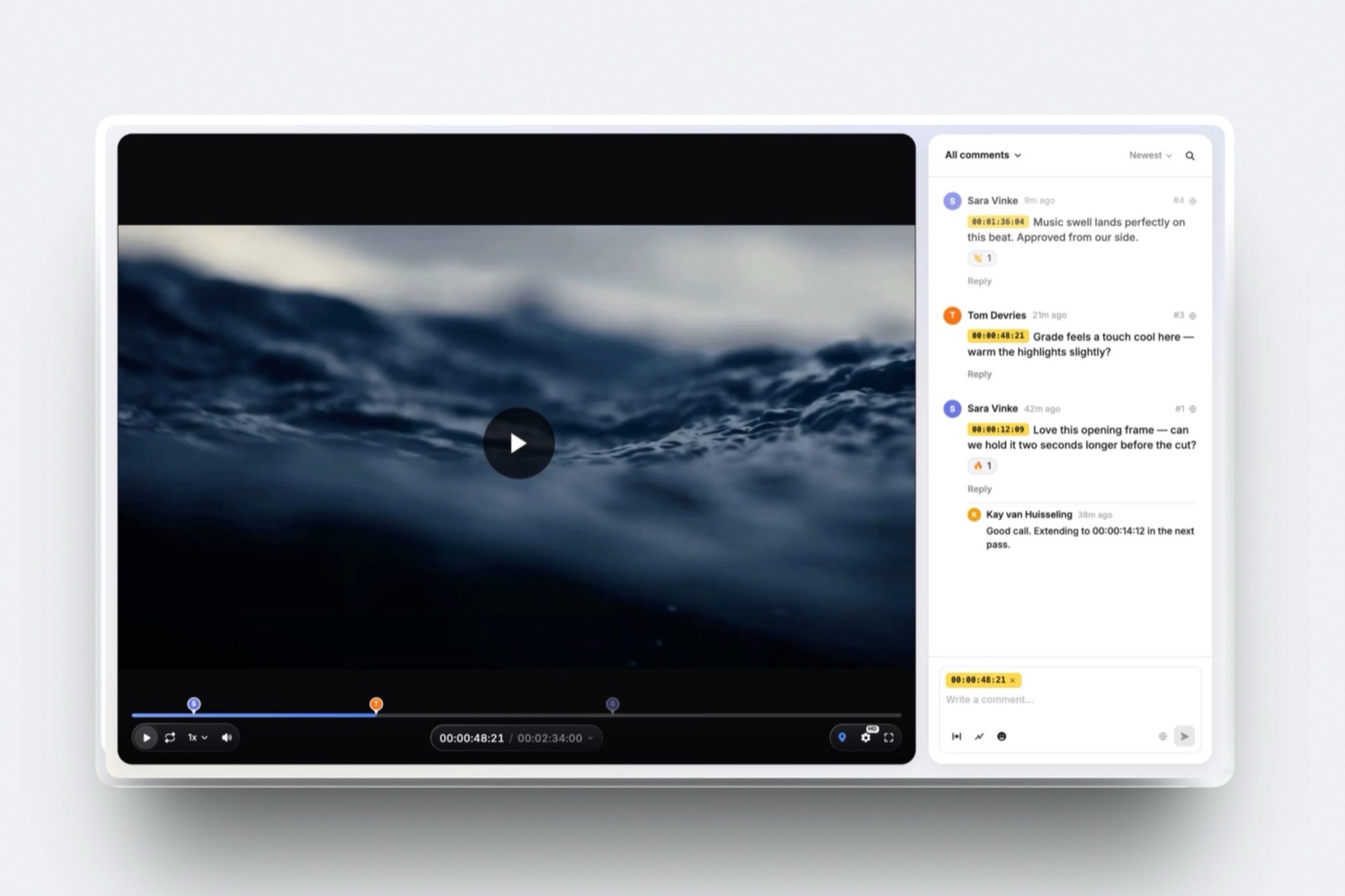
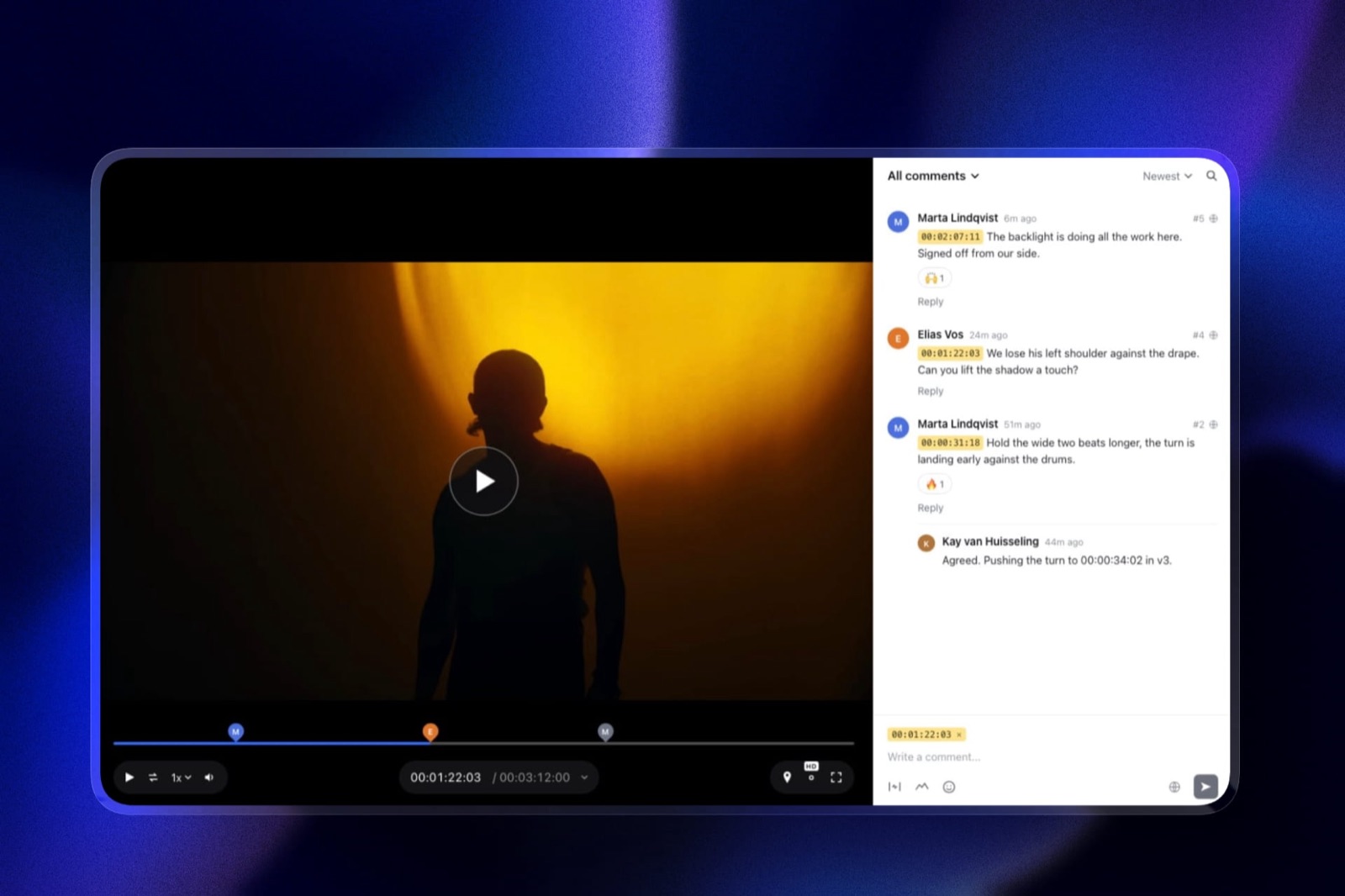
The composer has a range toggle: the in-point sits where the client paused, the out-point follows the playhead, and "lands too hard" becomes a note covering the last twelve frames of the move rather than frame 103.
The same composer has a pen, arrows, lines, boxes and circles for the spatial quarter of your feedback, so "nudge the logo left" is drawn rather than described.
Then the round gets worked like a list. Every note can be ticked complete, the sidebar filters to unresolved, and finished notes sink to the bottom, which matters on a 30-second build where forty notes across three versions is normal.
New renders stack as versions with their notes kept, and the client sets the cut to approved or needs changes themselves, without an account.
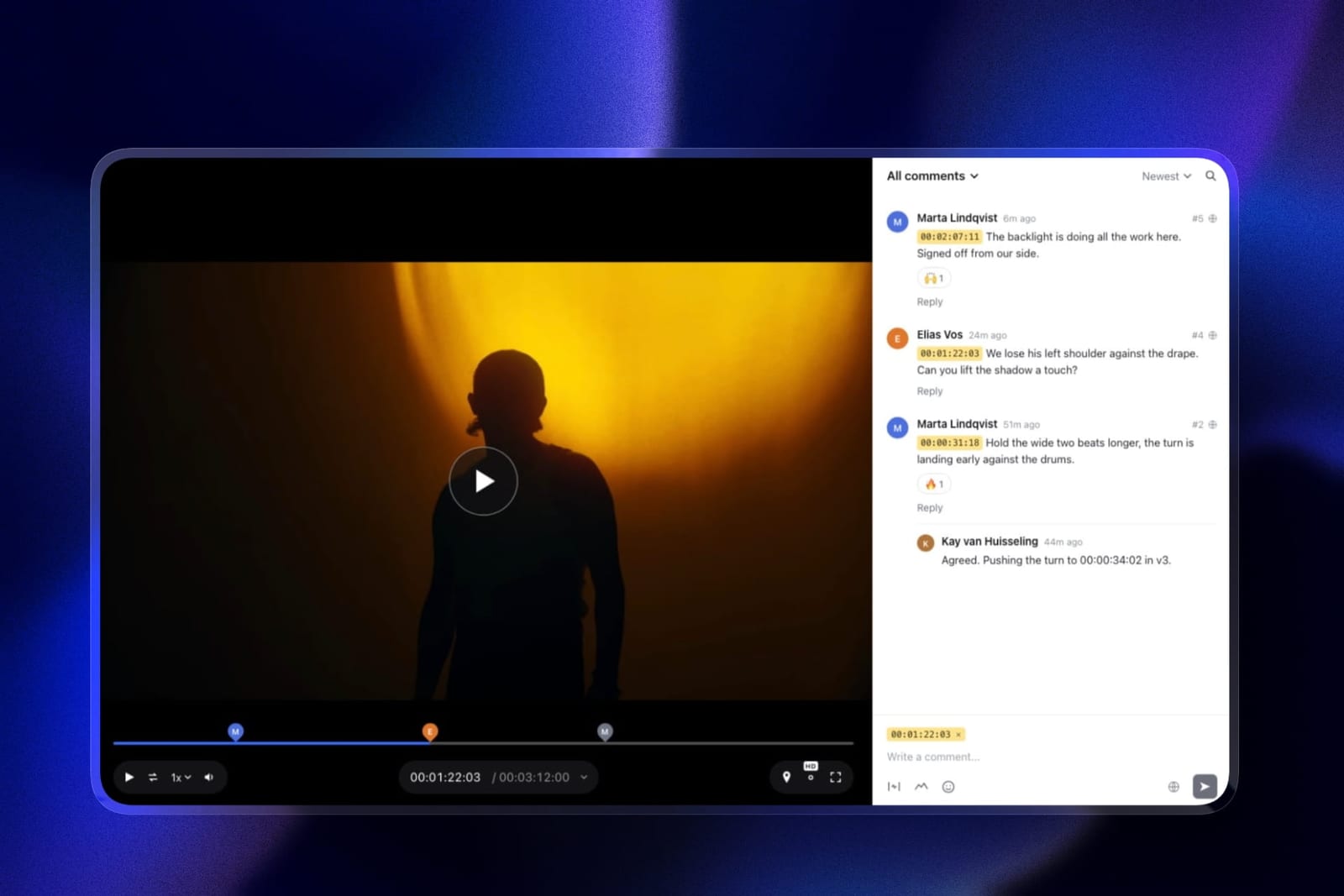
The real numberrange comments and drawing are on the free plan, which has a 500MB per-file cap, more than enough for a 30-second render. Starter at 9 dollars a month, 108 a year, is 11 dollars a year less than Wipster Light and adds your own domain on the review page.
The standout detailtimecode display modes. Reviewers can read the timeline in the source file's own timecode when the render carries one, so a note lines up with the numbers in your comp rather than a player clock.
The honest gotchano After Effects extension, or any other editing-software panel. You read notes in the browser and jump to each range in your comp by hand, which is exactly the step Wipster removes.
Skip it ifyou live in After Effects and want client notes inside it. Wipster is the only tool here that does that.
Verdict: the best tool here for recording what a motion note actually means, spans and positions both, on every plan including free, with a portfolio site on the same account. Pair the saving with a disciplined habit of jumping to each range yourself.
2. Wipster: The Only After Effects Route
Wipster wins this on a single feature that no competitor offers, and for a motion designer it is the one that removes real work. Light is 9.95 dollars a month billed annually with 50GB for one person, with pinpoint annotation using shapes, arrows and freehand drawing, and extensions for both Premiere Pro and After Effects.
The real number119.40 dollars a year, and it is the cheapest way in this comparison to have client feedback appear next to the application you will actually fix it in. Frame.io covers Premiere Pro and Final Cut, which is broader in one direction and misses the one that matters here.
The standout detailcomments become tasks you tick off.
On a 30-second animation with forty notes across three versions, that is the difference between working a list and re-reading a thread, and motion work generates unusually dense note counts because every element has timing, position, scale and colour to argue about.
The gotchano range comments. Wipster's annotation is spatial and its comments are pinned, so the twelve-frame easing note still arrives as a point plus a sentence. It has the best route out and not the best way in.
Skip it ifyou work primarily in Cinema 4D, Blender or Houdini rather than After Effects. The extension is the reason to choose it and it does not extend there.
What reviewers say elsewhere4.8 out of 5 across 75 reviews on Capterra, on a smaller sample than the category leaders.
Verdict: ranked second, and first for anyone who lives in After Effects, because getting a note into the comp saves real time every round. It has the best route out and a pinned comment on the way in.
3. Frame.io: Best Capture Plus Premiere Pro
If Wipster is the best exit, Frame.io is the best entrance.
Comments are frame-accurate and range-based, so a note can cover 00:04 to 00:06 rather than sitting on one instant, drawn annotation is on every tier including free, and the comparison viewer lets you set two versions of a build against each other.
The real numberPro is 15 dollars per member per month, so 180 dollars a year, about 61 dollars more than Wipster. Range comments and annotation are both on the free 2GB tier, which makes a free Frame.io account genuinely useful to a motion designer evaluating this.
The standout detailrange-based comments are the single most motion-relevant feature in this entire comparison and they are mentioned almost nowhere in the category's marketing.
A client dragging across the last half-second of a logo build and typing "too hard" has communicated the actual problem, which no pinned comment can do.
The gotchathe editorial panels cover Premiere Pro and Final Cut Pro, not After Effects. So the tool that captures motion notes best cannot deliver them into the application motion designers use, which is a genuinely frustrating gap and the reason Wipster ranks above it here.
Verdict: the better tool and the worse fit, unless you also cut in Premiere Pro. If your work runs through both applications, this is the right single purchase.
4. SyncSketch: Best for Character and Sketch-Led Work
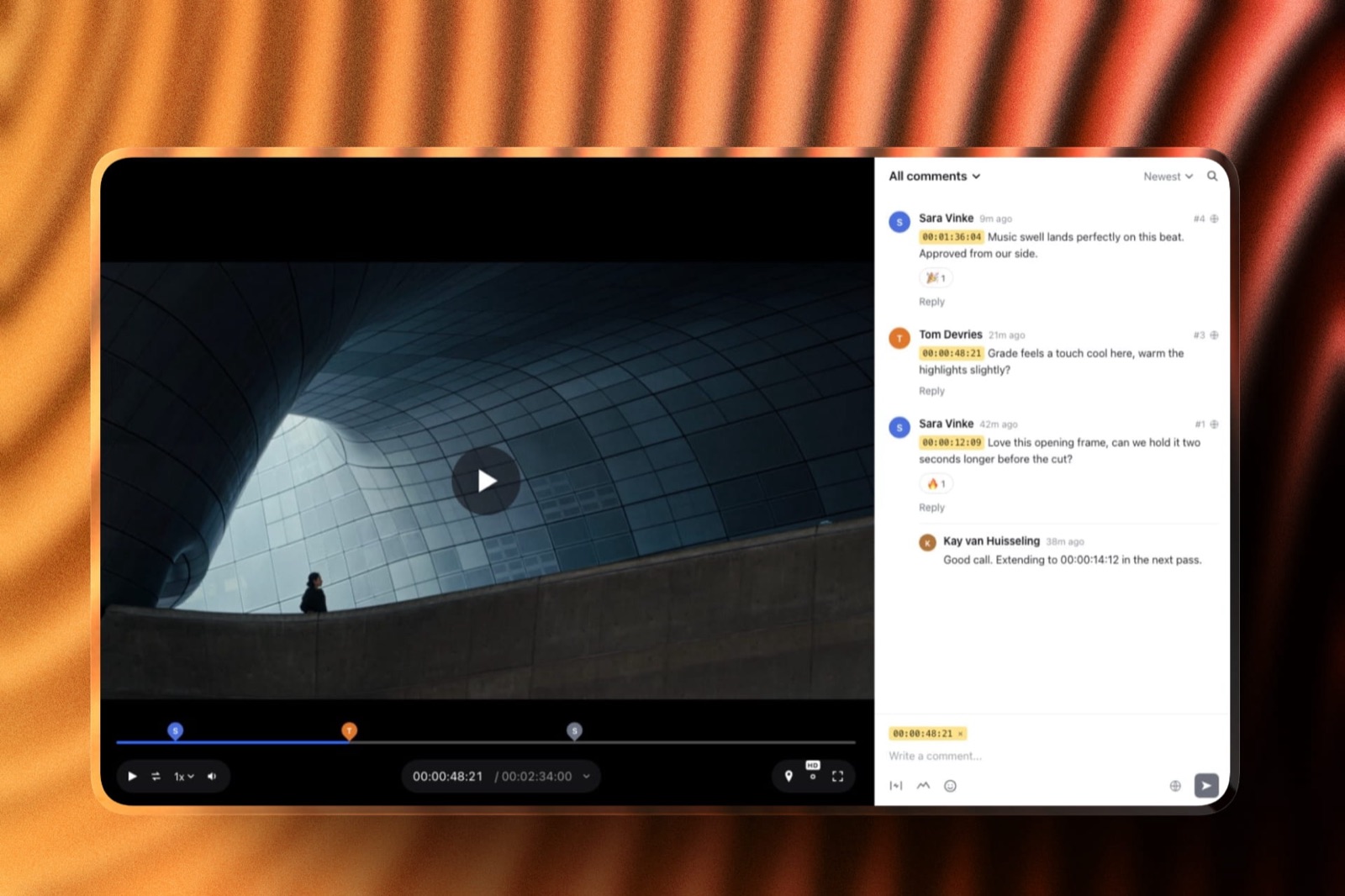
Indie is 9 dollars per user per month billed yearly with 50GB and 100GB of uploads, and Team at 19 dollars adds 3D model support and customisable sketching brushes, plus a collaborative whiteboard.
The standout detailthe whiteboard lets you sketch across a timeline rather than onto a single frame, which is the closest anything here comes to drawing an arc or a timing chart.
For motion designers whose work involves character movement rather than graphic builds, that is a meaningfully better vocabulary than a pinned circle.
The gotchano After Effects route and no range comments, and the free Light tier is under 1GB with a 2GB monthly upload allowance, so it is an evaluation account rather than a plan.
Verdict: the strongest drawing tools on this page and the right choice when your motion work is character-led. A mismatch for logo builds and data visualisation.
5. Dropbox Replay: Range Comments and Live Drawing
Replay is one of three tools here that lets a reviewer comment on a range of time, alongside drawing on the frame with colour and stroke control and live sessions where everyone sees each other's cursors, with no account needed for reviewers.
The real numberan add-on from 10 dollars a month on top of a Dropbox plan, so roughly 120 dollars a year plus your storage. The entitlement bundled into paid Dropbox plans is four file uploads in total, which three versions of one animation nearly exhausts.
Verdict: the cheapest way to get range comments if you already pay for Dropbox, and a live drawing session is genuinely useful for talking a client through timing in real time rather than in writing.
6. Krock.io: Storage and Storyboards
Pro is 10 dollars per user per month with unlimited team size and from 2TB, with drawing, unlimited reviewers on every plan, 4K playback named explicitly and a storyboard tool.
Verdict: the storyboard tool suits motion designers who board sequences before animating, and 4K matters if your deliverable is finishing rather than an offline. No range comments and no After Effects route.
7. ReviewStudio: Best Free Drawing
Unlimited users and unlimited guests on a free 5GB tier with drawing, versioning, compare mode, present mode and approvals.
Verdict: the best no-cost option for spatial notes, and present mode is useful for walking a client through timing live. Pinned comments only, so temporal notes still lose information.
8. Kollaborate: Cheap, No Tools
Twelve published tiers from 7 dollars a month for 30GB up to 539 dollars for 10TB, flat per account, with unlimited projects and unlimited bandwidth.
Verdict: the cheapest option here and the least suited, with no annotation and no range comments. Useful as a delivery layer alongside a real review tool.
9. Vimeo: Hosting With Comments
Starter is about 8 euros a month billed annually with 1 user and 2TB, with review and collaboration tools included and timestamped comments confirmed in Vimeo's own material.
Verdict: drawing is not confirmed in its published documentation and range comments are absent, so it captures the least of a motion note. Genuinely good if the finished animation also needs to live publicly.
The Note You Cannot Record
In one linethe gap between what a client means and what a review tool can store is wider in motion design than in any other discipline, and closing it is worth more than any price difference on this page.
Follow one note through. A client watches a logo build, feels the landing is too abrupt, pauses at 00:04.12 and types "lands too hard". On six of the nine tools here, that is now a comment pinned to frame 103.
What the designer needs to know is that the note concerns the ease-out on the final move, roughly frames 95 to 107, and specifically its deceleration.
On Framekit, Frame.io or Dropbox Replay the client can mark that span, which converts a guess into an instruction.
On the other six, the designer opens the project, watches the move several times, forms a hypothesis, changes the curve, exports, and finds out next round whether the hypothesis was right.
That is one extra round per ambiguous note, and motion work generates more of them than any other discipline because so much of its vocabulary is temporal. The entire price spread on this page is 96 dollars a year.
One avoided round is worth more than that to almost anyone reading this.
The test you can runtake your last set of client notes and mark each one as temporal, spatial or general. If temporal notes are the largest group, range comments should decide your choice and nothing else on this page should.
Where After Effects Fits, and Does Not
In one linemotion design is the one discipline where the review tool with the best capture and the review tool with the best delivery are different products, and you have to choose which half to optimise.
The situation is genuinely awkward. Framekit and Frame.io capture motion notes best, with range comments and annotation, and neither delivers into After Effects; Frame.io's panels serve Premiere Pro and Final Cut Pro instead.
Wipster delivers into After Effects and cannot record a range. No tool in this comparison does both.
Three practical resolutions exist and they suit different people.
If you work in both After Effects and Premiere Pro, which many motion designers do for finishing, Frame.io covers the cutting half and you accept manual transfer into After Effects.
If capture matters most and you are happy jumping to each range yourself, Framekit records it for the least money. If you live almost entirely in After Effects, Wipster's extension saves more time than the better capture would.
And if your clients are trained enough to write good timecodes in prose, the capture problem shrinks and you should optimise for delivery.
The fourth option, running a free account for range comments alongside a paid tool for everything else, is not as absurd as it sounds.
Frame.io's free tier includes range comments and annotation on 2GB with two projects, and Framekit's free tier includes both with no project limit and a 500MB per-file cap.
Which Tool Fits Your Motion Work? A Decision Tree
Work through these in order and stop at the first yes. The first two questions matter more than every price on this page.
- Do you live in After Effects? Wipster at 9.95 dollars a month, for the only After Effects extension in this category.
- Are most of your notes about timing, easing or duration? Framekit, with range comments and drawing on every plan including free, or Dropbox Replay if you already pay for Dropbox.
- Do you also cut in Premiere Pro or Final Cut? Frame.io, which covers both and captures motion notes best.
- Is your work character animation rather than graphics? SyncSketch, for the sketching brushes and the timeline whiteboard.
- Do you board sequences before animating? Krock.io, whose storyboard tool removes a separate product.
- Do you need to walk a client through timing live? Dropbox Replay for shared cursors, or ReviewStudio's present mode on its free tier.
- Do you want drawing at no cost? Framekit's free plan with ranges and no project limit, ReviewStudio's free 5GB tier, or a free Frame.io account on two projects.
- Do you also need a portfolio that wins the next brand job? Framekit, where the review page and your site share one account. Our website builders for motion designers guide covers the portfolio side.
Frequently Asked Questions
What is the best video review tool for motion designers in 2026?
Framekit is the best video review tool for motion designers in 2026, because it records range comments for easing and holds, drawings for position, and a tick-off list of notes on every plan including free, from 9 dollars a month.
Wipster at 9.95 dollars a month is the better pick if you want notes inside After Effects, since it has the only After Effects extension in this category but anchors comments to a single frame.
Which review tools support range-based comments?
Three.
Framekit offers range comments with an in-point and out-point on every plan including free, Frame.io offers frame-accurate and range-based comments on every tier including its free 2GB plan, and Dropbox Replay allows commenting on a range of time.
The other six tools in this comparison anchor every note to a single point, which structurally misrepresents any feedback about easing, duration or stagger.
Why do pinned comments fail for motion design?
Because most motion notes are about spans.
"It lands too hard" concerns the last eight to fifteen frames of a deceleration, "that reads too fast" concerns a duration with a start and an end, and "the bullets feel uneven" concerns the gaps between several events.
A comment pinned to one frame records where the client noticed the problem rather than where the problem is, which costs a round while you work out the difference.
Does any tool integrate with After Effects?
One. Wipster offers extensions for both Premiere Pro and After Effects, bringing client feedback next to your timeline, starting at 9.95 dollars a month on its Light plan.
Frame.io's editorial panels cover Premiere Pro and Final Cut Pro only. No other tool in this comparison integrates with any motion application, so notes are read in a browser and applied by hand.
Is annotation or range commenting more important for motion work?
Range commenting, for most motion designers. Drawing solves spatial notes about where something sits or how big it is, which is roughly a quarter of typical motion feedback.
Ranges solve temporal notes about easing, duration and rhythm, which is the majority.
A tool with drawing and no range handles the smaller category well, which is why Framekit ranks first and Frame.io third here despite neither having an After Effects route.
What is the cheapest tool with drawing for motion designers?
SyncSketch Indie at 9 dollars per user per month billed yearly, which includes 50GB, 100GB of uploads and customisable brushes on the Team tier above it. Wipster Light at 9.95 dollars includes annotation plus the After Effects extension.
If free is the requirement, Framekit's free plan includes drawing and range comments with no project limit, ReviewStudio's 5GB tier includes drawing with unlimited users, and Frame.io's free tier includes both on two projects.
Framekit vs Wipster for motion design: which should I choose?
Choose Framekit if capturing the note matters most and Wipster if delivering it into After Effects does.
Framekit records range comments for easing and holds plus drawings for position, and lets you tick notes off, on every plan including free.
Wipster Light at 9.95 dollars a month pins each comment to one frame but is the only tool here with an After Effects extension, so client notes appear beside your comp.
Can I use two tools, one for capture and one for delivery?
Yes, and it is a more reasonable answer than it first sounds, because no single tool does both well.
Frame.io's free tier includes range-based comments and annotation on 2GB with two projects, which covers one active client review, alongside a paid tool for everything else.
The friction is that your client has to use whichever one you send them, so pick per project rather than per job type.
How do clients give better motion feedback?
Ask them to mark a range rather than pause, on the three tools that allow it, and to answer one question per note: is this about when something happens, where it sits, or how it feels.
That single framing converts a large share of ambiguous notes into actionable ones even on tools with pinned comments only, and it costs nothing to introduce.
Which tool is best for character animation rather than graphics?
SyncSketch, whose customisable sketching brushes, 3D model support on Team at 19 dollars per user, and collaborative whiteboard that sketches across a timeline are all built for character work.
Its drawing vocabulary is closer to how animation notes are given than a red pen on a still frame, and its PDF session export reaches artists who were not in the review.
Do motion designers need 4K review?
Only if the deliverable is finishing rather than an offline approval.
Fine text, thin strokes and subtle gradients in motion graphics genuinely suffer at 1080p, so if your client signs off on the final render rather than a proxy, Krock.io names 4K playback explicitly at 10 dollars per user and Frame.io lists 4K UHD playback on its paid tiers.
Framekit makes proxies up to 1080p and lets the reviewer switch to the original render. Most other tools in this comparison do not commit to a playback resolution.
What happens to my notes when I upload a new version?
On tools with version stacks the notes stay attached to the version they were made on, which matters in motion work because a note about frame 103 of version two refers to nothing in version three if the timing changed.
Frame.io additionally allows comments to be copied and pasted between assets, and Framekit keeps each version's notes in its stack when a new render goes up.
Check this behaviour before committing, since motion revisions frequently shift every subsequent frame.
Final Verdict
Framekit is the best video review tool for motion designers in 2026 because it records what motion notes actually are: ranges for easing, holds and stagger, drawings for position, and a list you tick through, on every plan including free.
Range-based comments are the single most motion-relevant capability in this comparison and almost nobody markets them.
Wipster wins on delivery rather than capture. Its After Effects extension is the only route in this category from a client's comment into the comp, at 119.40 dollars a year.
Frame.io captures notes as well as Framekit does and becomes the right single purchase if you also cut in Premiere Pro or Final Cut.
Where Framekit loses, and who should not use it. Framekit has no After Effects extension, or any editing-software panel, so every note is read in the browser and applied by hand, and its drawing is a pen and shapes rather than SyncSketch's sketching brushes.
A motion designer who lives in After Effects and wants notes inside the comp is a better fit for Wipster, and a character animator is a better fit for SyncSketch.
If you take one thing from this page, make it the sorting exercise: mark your last twenty client notes as temporal, spatial or general. Almost every motion designer who does this discovers the majority are temporal, and that single fact should decide the purchase.
Related readingthe best video annotation tools, the 12 best video review tools, video review tools for animation studios, and website builders for motion designers.
Competitor prices were read at each vendor's published pricing page in August 2026, Framekit's were checked again in September 2026, and capabilities were confirmed against each vendor's own product documentation, since range-based commenting in particular is rarely mentioned in marketing material and had to be verified feature by feature.