Framekit templates
Start from a designer-made template
 Use template
 Use template
 Use template
 Use template
 Use template
 Use template
 Use template
 Use template
Milanote is the rare tool that creative people recommend to each other unprompted, and the reason is that it does not feel like project management. Boards nest inside boards. Images sit next to notes.
Nothing asks you to assign an owner or set a due date before you have finished thinking.
The reason people go looking for Milanote alternatives is almost always the same specific wall, and it is not the one advertised. Everyone quotes the free plan's 100 notes, images, or links.
The limit that actually stops creative work is 10 file uploads, total, forever. Two reference PDFs, a font file, a handful of scans, and you are done.
A visual planning tool is a board-based workspace where images, notes, links, and files sit together on a spatial canvas, designed for gathering references and shaping an idea rather than tracking tasks.
The best Milanote alternative in 2026 is Notion, because its free personal plan has no meaningful upload cap, it handles both the visual boards and the writing that surrounds them, and it costs $10 per user a month when a team eventually needs one against Milanote Team's $49 a month.
The honest trade-off is that Notion's boards are databases wearing a gallery view, so the free-form spatial arrangement that makes Milanote pleasant is simply not there.
Are.na is the pick for long-term visual research, FigJam for design teams, Eagle for a local library of thousands of references, and Framekit Slides for turning a finished board into a treatment or deck, free, though it has no canvas to think on.
Full disclosure: Framekit is our own product. It has since shipped Slides and now ranks fourth, as the finishing step after a board rather than a planning canvas; Notion, Are.na and Miro plan creative work better than we do. We reviewed it from its features and published pricing, not the same rebuild.
Re-verified on 19 September 2026 for Framekit's features and prices; competitor prices are as published in August 2026.
How We Compared These Milanote Alternatives
We rebuilt the same project board ten times: a short film's pre-production board with a treatment draft, forty-two reference images, six PDF documents including a location agreement and two font specimens, a linked shot list, a cast board with nine headshots, and a nested board per scene.
The carried scenario is a two-person production company running four projects a year and sharing boards with a director and a client.
Visual arrangement. Can you place things freely, or does the tool insist on a grid, a list, or a database row?
Files, not just images. Specifically whether the tool takes PDFs, fonts, and documents, and what it caps, because this is where Milanote stops.
Nesting. Whether a board can contain a board, which is the structure creative projects actually have.
Sharing with a non-user. Whether the director and the client can see and comment without creating an account.
Cost for one person and for a small team, at annual rates.
One caveat: Framekit's entry in the counts below is its earlier website entry, from before Slides shipped.
Where the confidence comes from: the ten rebuilds, the upload tests, the nesting tests, and the guest-sharing tests are ours, done in August 2026. Prices come from each vendor's published pricing, linked where a figure carries weight.
Where we could not confirm a current price from a primary source we describe the plan structure and say so rather than repeating a third-party number.
What Rebuilding One Creative Board Ten Times Showed
The category is more fragmented than it looks, because half of these tools are visual and half are structural, and creative planning needs both.
- 4 of 10 allow genuinely free-form placement. The rest snap to a grid, a database, or a list.
- 6 of 10 have no practical cap on file uploads at their free tier. Milanote's cap is 10.
- 5 of 10 let a client view and comment without creating an account.
- 3 of 10 support boards nested inside boards more than two levels deep.
- Cost for one person ran from $0 to $120 a year, and for a small team from $0 to $588.
- 2 of 10 keep your boards as files on your own machine rather than on a vendor's server.
Milanote Alternatives Compared
The weighting behind the order: visual arrangement 25%, file handling 20%, nesting and structure 20%, sharing 20%, cost 15%.
File handling is weighted heavily because the upload cap is the specific thing that sends people looking, and several otherwise appealing tools are worse at it than Milanote.
| Tool | Free plan | Paid from | Free-form placement | Nested boards |
|---|---|---|---|---|
| Milanote | 100 items, 10 uploads | $9.99/mo annual | Yes | Yes |
| Notion | Unlimited personal | $10/user/mo annual | No, database views | Yes, unlimited |
| Are.na | Unlimited public channels | Premium subscription | No, grid | Yes, channels in channels |
| Miro | 3 editable boards | $8/member/mo annual | Yes | Frames, not true nesting |
| FigJam | 3 files | $3/mo annual | Yes | No |
| Unlimited | Free | No, masonry grid | Boards and sections | |
| Eagle | Trial, then one-time | $29.95 one time | No, library grid | Yes, folders |
| Obsidian Canvas | Free, local files | Free for personal use | Yes | Yes, via linked canvases |
| Trello | 10 boards per workspace | $5/user/mo annual | No, columns | Limited |
| Apple Freeform | Free on Apple devices | Free | Yes | No |
| Framekit Slides | Unlimited decks | $7/mo annual (Starter) | Fixed slide pages | No |
Framekit's paid price is Starter billed yearly, per Framekit's pricing page. On this weighting it scores 0 out of 10 on nesting, its lowest mark, against 9 on cost.
1. Notion: The Best Milanote Alternative Overall
Best forcreative people whose projects involve as much writing as imagery.
Notion is the most complete replacement and the least like Milanote to use, which is the trade at the centre of this list.
Our film board rebuilt cleanly: the treatment became a proper document with version history, the shot list became a database that could be filtered by location, and the reference images became a gallery view.
What it does that Milanote cannot is hold the writing. A treatment in Milanote is a note on a board; in Notion it is a document that can be commented on line by line, linked from six places, and turned into a template for the next project.
The real numberNotion is free for personal use with no practical upload cap, and Plus is $10 per user a month billed annually, or $12 monthly. Business is $18 per user a month annually.
Against Milanote's Team plan at $49 a month for the whole team, Notion is more expensive above five people and free for one.
The standout detailas of July 2026 Notion's AI features, including agents and meeting notes, are bundled into the Business plan rather than sold as a separate add-on, which changes the arithmetic for teams who were pricing them separately.
The gotchayou cannot place things freely. Every board is a database in a gallery or board view, so items arrange themselves in a grid and the loose, pinned-to-a-wall quality of a Milanote board is gone.
For mood boarding specifically this is a real loss and the main reason people bounce back.
Skip it ifthe spatial arrangement is the thinking. Some people compose visually and Notion will fight that every day.
What reviewers say elsewhereNotion holds a 4.7 out of 5 across more than 2,000 reviews on G2, where flexibility is the most praised attribute and the learning curve the most criticised.
Verdict: the right pick when a creative project is half writing, and the wrong pick when it is a wall of images. Free for one person with no upload wall, which alone solves the problem that brought most people here.
2. Are.na: Best for Visual Research That Lasts
Best fordesigners, artists, and researchers building a reference library over years rather than a board over weeks.
Are.na is the most quietly beloved tool in this category and the least like a product. Channels hold blocks; blocks can live in many channels at once; a channel can contain another channel.
That last property is the one that matters, because a reference gathered for one project stays connected to every other project it also belongs to.
Rebuilding our film board took the longest of the ten and produced something more useful than the original, because the location references joined an existing channel of brutalist architecture rather than sitting in a folder for one project.
The real numberAre.na is free to use with unlimited public channels, and its Premium subscription unlocks unlimited private channels and uploads.
Check the current rate on their pricing page, since we could not confirm it from a primary source at the time of writing and would rather say so than repeat a number we have not seen.
The standout detailthere is no algorithm, no feed ranking, and no advertising. For visual research this matters more than it sounds, because Pinterest's recommendations quietly shape what you find and Are.na's do not.
The gotchathe free tier's private channels are limited, and a working film project usually needs privacy. Budget for Premium if the work is client-confidential.
Skip it ifyou need to lay things out spatially. Are.na is a grid and does not pretend otherwise.
Verdict: the best long-term home for visual references on this page, and a poor project board. Many people end up running Are.na for research and something else for projects, which is a reasonable outcome rather than a failure.
3. Miro: Best for Boards a Team Works On Together
Best forcreative teams who need several people on the same board at once.
Miro handles everything Milanote does spatially and adds real multiplayer, comments, and facilitation. Our film board worked well, with the scene boards as frames and the whole project navigable from a single overview.
The real numberMiro Starter is $8 per member a month billed annually, which is $96 a year, and Business is $240. The free plan caps at three editable boards, which for a production company running four projects a year is one project short.
The gotchaMiro is built for product process, and it shows in the templates, the language, and the defaults. A creative board in Miro always looks slightly like a retrospective that got out of hand.
Skip it ifyou work alone. You would be paying for multiplayer you never use.
Verdict: the strongest team option, at a per-seat price that adds up faster than Milanote's flat Team plan. Better tool, worse pricing model for small creative studios.

4. Framekit Slides: Best When the Board Has to Become a Treatment or Deck

Best forfilmmakers, photographers and designers who use Milanote to shape a project and then rebuild the result as a treatment, lookbook or pitch deck to show a client.
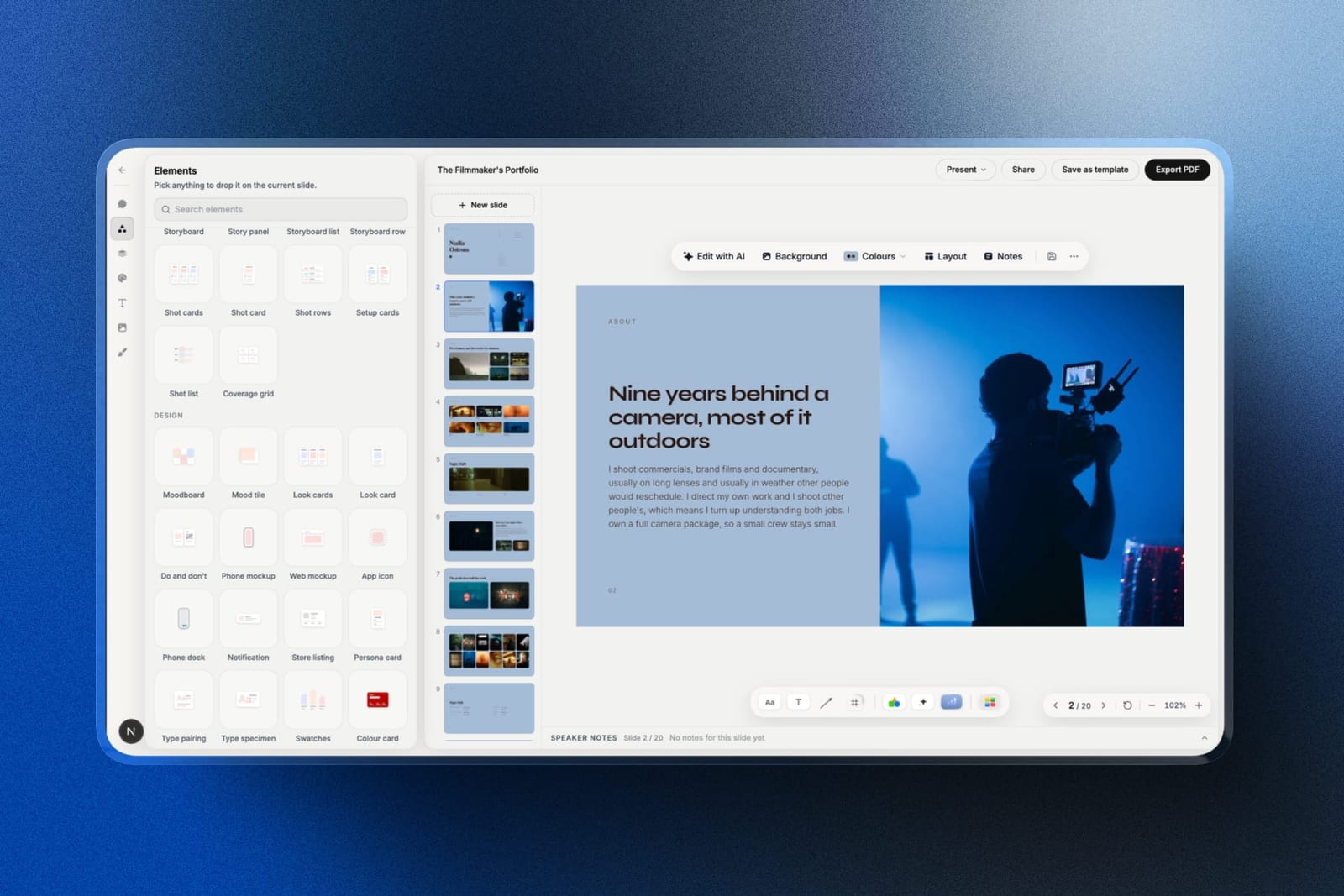
Framekit is an AI website builder that now ships Slides, a deck tool in the same account as your portfolio site, client galleries and video review.
It is not a thinking canvas, and on this page's weighting it would score lower than fourth: there is no infinite board, no nesting, no web clipper and no sticky notes.
We place it here because it covers the step after the board, the finished document a director or client actually sees, which the planning-only tools below it do not attempt.
This review is based on Slides' shipped features and published plans, not the same board rebuild as the other nine.
The overlap with Milanote is the vocabulary.
Slides ships ready-made moodboards, look cards, swatches, shot lists, shot cards and storyboard panels and rows, alongside treatment and lookbook templates, so the pre-production board's references and shot list can land in a laid-out deck rather than a PDF of a board.
The AI writes and lays out a slide from a description, and a YouTube or Vimeo reference plays inside the shared link.
The real number$0 for unlimited decks, with the AI slide writer, presenting, a share link and PDF export, against Milanote's $119.88 a year. Your own fonts, the template library and removing the small Made with Framekit credit start on Starter at $84 a year billed yearly.
The standout detailthe finished treatment lives next to the reel site and the client galleries the same project will use later, so the board's afterlife is not a separate subscription.
The gotchayou cannot think in it the way you think in Milanote. Slides are fixed pages, there is no guest commenting on a deck link and no live co-editing, and the .pptx export (Pro and up) is picture-based.
Skip it ifthe board is still working material. Keep Milanote, Notion or Are.na for that and bring the result here.
Verdict: not a Milanote replacement for the thinking, and the best place on this list to finish what the thinking produced. Start a treatment free at framekit.ai/slides.
5. FigJam: Best for Design Teams
Best forstudios whose creative planning sits next to design files.
FigJam is spatially free, pleasant to use, and cheap. Its advantage over everything else here is that images and screens from a Figma file arrive as real content rather than flattened images, so a mood board can contain live design work.
The real numbera Figma Collab seat is $3 a month billed annually, which is $36 a year, and the free Starter plan includes three FigJam files. That is the cheapest paid tier in this comparison by a wide margin.
The gotchano nesting. A FigJam file is one canvas, so a project with six scene boards becomes six regions on one very large surface, and finding anything after a month means remembering where you put it.
Skip it ifyour projects have deep structure. Flat canvases do not scale past a certain complexity.
Verdict: excellent value for design studios and structurally shallow. Best used for one project at a time rather than as a system.
6. Pinterest: The Best Free Mood Boarding Tool
Best forthe pure reference-gathering half of what people use Milanote for.
It is worth being honest that for a lot of Milanote users, the tool is a mood board with extra steps, and Pinterest does mood boards better than anything on this page for nothing.
Discovery is the reason: saving one reference surfaces twenty adjacent ones, which is a genuine creative advantage and not a feature any private tool replicates.
The real numberfree, with no upload cap and no board limit. Secret boards keep client work private.
The gotchait is an advertising business, so the recommendations that make discovery good also shape what you see, and the same visual language propagates across everyone using it.
Several art directors describe this as the reason briefs increasingly look alike, and we report that as sentiment rather than as something we measured.
Skip it ifyou need documents, PDFs, or writing on the same board. Pinterest holds images and links and nothing else.
Verdict: free, better at discovery than anything here, and only a third of a Milanote replacement. Use it as the reference layer and keep the project somewhere else.
7. Eagle: Best for a Local Asset Library
Best foranyone whose real problem is thousands of references on a hard drive with no way to find them.
Eagle is a different answer to the same need. It indexes a local folder of images, video, fonts, and documents, tags them automatically, and finds anything in seconds.
Our forty-two references and six PDFs imported in under a minute, and the font specimens were previewable as type rather than as file icons.
The real number$29.95 as a one-time purchase per licence, with no subscription. Against Milanote's $119.88 a year, that pays for itself in three months and keeps working after that.
The standout detailit reads font files properly, so a specimen board of thirty typefaces is browsable as rendered type. For designers this is the feature that makes it stick.
The gotchait is a local desktop application, not a collaboration tool. Sharing a board with a director means exporting or sending files, and there is no live link to send a client.
Skip it ifanyone else needs to see the board.
Verdict: the best value on this page for solo creatives with a large reference library, and no help at all for collaboration. A one-time purchase in a category of subscriptions is worth noticing.
8. Obsidian Canvas: Best If You Want to Own the Files
Best forpeople who have lost work to a tool shutting down and do not intend to repeat it.
Obsidian Canvas gives you free-form spatial placement, nesting through linked canvases, and notes that are plain Markdown files in a folder on your own machine. The .canvas format is open JSON, so nothing is trapped.
The real numberfree for personal use with no caps of any kind. Optional paid services cover syncing across devices and publishing.
The gotchacollaboration is not the model. Two people on a canvas means syncing a folder, which works for a pair and does not work for a session.
Skip it ifa client needs a link.
Verdict: the only tool here where the boards are genuinely yours, at a cost of collaboration that is total rather than partial.
9. Trello: Best for Turning a Board Into a Project
Best forthe moment a creative board needs to become a schedule.
Trello is on this list because a lot of Milanote boards eventually stop being about ideas and start being about who is doing what by Friday. Trello does that transition better than anything else here, and its card covers make it more visual than most project tools.
The real numberfree with a cap of 10 boards per workspace, with Standard at $5 per user a month billed annually, or $6 monthly, and Premium at $10 annually. Enterprise carries a 50-seat minimum.
The gotchait is columns, not canvas. Free-form arrangement does not exist, and a mood board in Trello is a list of image attachments.
Skip it ifthe board is still at the thinking stage.
Verdict: the cheapest structured option and the least visual. The right tool for the second half of a project rather than the first.
10. Apple Freeform: Best Free Canvas on Apple Devices
Best forsolo creatives on Apple hardware who want a free spatial canvas today.
Freeform is free, installed already, syncs through iCloud, and has the best handwriting and sketching experience on this page with an Apple Pencil. Our board rebuilt quickly and looked good.
The real numberzero, with no board or upload cap, on any Apple device.
The gotchacollaborators need Apple Accounts, there is no web version for Windows or Android, and there is no nesting or organisation beyond a flat list of boards. Past about a dozen boards it becomes hard to navigate.
Skip it ifa collaborator is on Windows, or you keep more than a dozen projects.
Verdict: genuinely good and genuinely limited. For a solo Apple user planning one project at a time, it costs nothing and does the job.
What Milanote's Limits Actually Cost
The free plan's caps are the reason most people arrive here, so here is what they mean in practice against the alternatives.
| Tool | Free file uploads | Free item cap | Cost for one person / year |
|---|---|---|---|
| Milanote | 10 | 100 notes, images or links | $119.88 |
| Notion | No practical cap | Unlimited personal | $0 |
| No cap | Unlimited | $0 | |
| Obsidian Canvas | Local disk only | Unlimited | $0 |
| Apple Freeform | iCloud storage | Unlimited | $0 |
| FigJam | Within 3 files | 3 files | $36 |
| Trello | 10MB per file, free tier | 10 boards per workspace | $60 |
| Miro | Within 3 boards | 3 editable boards | $96 |
| Eagle | Local disk only | Unlimited | $29.95 once |
A test that settles it in five minutes. Open your Milanote account and count the file uploads you have used.
If you are near ten and everything else you keep is images and links, Pinterest plus a free Notion page replaces it for nothing.
If you are past a hundred items and using nested boards seriously, Milanote's $119.88 a year is fair and the alternatives will cost you structure rather than money.
In one lineMilanote's pricing is reasonable for what it does, and its free tier is a demo rather than a product, which is worth knowing before you build four projects on it.
Which Milanote Alternative Fits You?
The right answer depends on which half of Milanote you actually use, so work down these in order and stop at the first yes rather than trying to score them all.
1. Do your projects contain as much writing as imagery? Notion, free for one person, with no upload wall.
2. Are you building a reference library you will still use in five years? Are.na, which connects references across projects rather than filing them per project.
3. Do several people need to be on the board at once? Miro, or FigJam if they are designers.
4. Is the board really a mood board? Pinterest, free, with better discovery than any private tool.
5. Do you have thousands of local references you cannot find? Eagle, at $29.95 once.
6. Do you want the boards to survive any company going away? Obsidian Canvas, stored as files on your own machine.
7. Has the board become a schedule? Trello, at $60 a year.
8. Are you solo on Apple hardware with one project at a time? Apple Freeform, free and already installed.
9. Is the board finished and now has to become a treatment, lookbook or pitch deck? Framekit Slides, free, with moodboard and shot list elements ready to hold what the board produced.
10. Is the board finished and simply something to show in your portfolio? Publish it as a page on your own site rather than sending a share link.
Frequently Asked Questions
What is Milanote's free plan limit?
Milanote's free plan allows 100 notes, images, or links and only 10 file uploads in total, with unlimited shared boards.
The 10-upload cap is the limit most creative users hit first, because reference PDFs, font files, and documents all count against it while images pasted as links do not.
How much does Milanote cost?
Milanote's individual plan is $9.99 a month billed annually, which is $119.88 a year, or $12.50 a month billed monthly.
The Team plan is $49 a month billed annually and covers a large number of people, which makes Milanote cheaper than most per-seat alternatives once a team passes about five people.
What is the best free alternative to Milanote?
Notion's free personal plan is the best free Milanote alternative overall, with no practical upload cap and support for both boards and writing.
Pinterest is the best free option for pure mood boarding, Obsidian Canvas is free with local file storage and free-form placement, and Apple Freeform is free on any Apple device.
Is Notion a good replacement for Milanote?
Notion replaces Milanote well for projects that involve writing, structure, and references together, and poorly for free-form visual arrangement, because every Notion board is a database view that arranges items in a grid.
If the spatial layout is part of how you think, Notion will feel like a downgrade regardless of its other advantages.
Is Are.na better than Pinterest for mood boards?
Are.na is better than Pinterest for research you intend to keep, because blocks can belong to many channels at once and there is no algorithm shaping what you see.
Pinterest is better for discovery, since saving one image surfaces adjacent references, and it is free with no upload limit while Are.na's private channels require a paid plan.
Which Milanote alternative works offline?
Obsidian Canvas and Eagle both work fully offline, because they store boards and libraries as files on your own machine rather than on a vendor's servers. Apple Freeform works offline and syncs later through iCloud.
Notion, Miro, FigJam, Milanote, and Are.na all assume a connection.
Can clients view a board without creating an account?
Milanote, Miro, FigJam, Notion, and Pinterest all support view-only sharing by link without the recipient creating an account, though commenting usually requires one.
Eagle and Obsidian Canvas have no link sharing at all, since both are local applications, which is the trade for owning the files.
Is Eagle worth it compared to a subscription?
Eagle is worth considering at $29.95 as a one-time purchase per licence, because it replaces roughly three months of Milanote's individual plan and then costs nothing.
It is a local library and organiser rather than a planning canvas, so it solves the reference problem completely and the collaboration problem not at all.
Which tool is best for film pre-production boards?
Milanote remains strong for film pre-production because of nested boards and free-form placement, and the main alternatives are Miro for teams, Notion when the treatment and shot list matter as much as the imagery, and Eagle for a large local reference library.
A common working setup is Are.na or Pinterest for references and Notion for documents, with Framekit Slides for the finished treatment, since it ships shot list, storyboard and moodboard elements.
Should a finished mood board be published as a web page?
A finished mood board is worth publishing as a page when it is being shown to clients or collaborators rather than worked on, because a page renders identically for everyone, does not expire, and can live permanently in a portfolio.
Boards still being figured out belong in a planning tool where they can be rearranged.
Final Verdict
Notion is the alternative most Milanote users should try first, because it is free for one person, has no upload wall, and holds the writing that creative projects generate alongside the images.
Are.na is the better answer if what you are really building is a research library. Pinterest, uncomfortably, replaces the mood-board half of Milanote for nothing and does discovery better than any paid tool here.
And Eagle at $29.95 once is the standout value for anyone drowning in local references.
Where Framekit losesFramekit is not a planning tool. It has no infinite canvas, no nested boards, no web clipper and no guest comments, so for gathering and arranging references Notion, Are.na, Miro or Milanote itself is the better fit.
Its case is narrower: the treatment or deck the finished board turns into.
The thing worth remembering is that Milanote's free tier is a demo. Ten uploads is not a soft limit you grow into, it is a wall you hit in week two, and planning four projects on it is not possible.
Related reading: our roundups of the best mood board tools, the best Miro alternatives, the best note-taking apps for creatives, and the best digital asset management software.
Every plan price above was read from the vendor's own pricing page in August 2026, except where we say explicitly that we could not confirm one. Free-tier caps in this category change more often than headline prices, so re-check before planning around a limit.